Unlocking individual transactions
You can unlock an individual transaction that has become locked based on your organization's transaction lock setting or that is attached to an unpaid insurance claim.
Note: Unlocking procedures, payments, and adjustments to edit them requires the "Override Locked Transaction" security right.
To unlock a transaction
-
If the correct patient is not already selected, use the Patient Search box to access the patient's record.

-
Do one of the following:
-
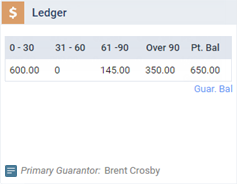
If the patient's Overview page is not already open, on the Patient menu, under General, select Overview. The patient's Overview page opens. Click (or tap) the Ledger box.
-
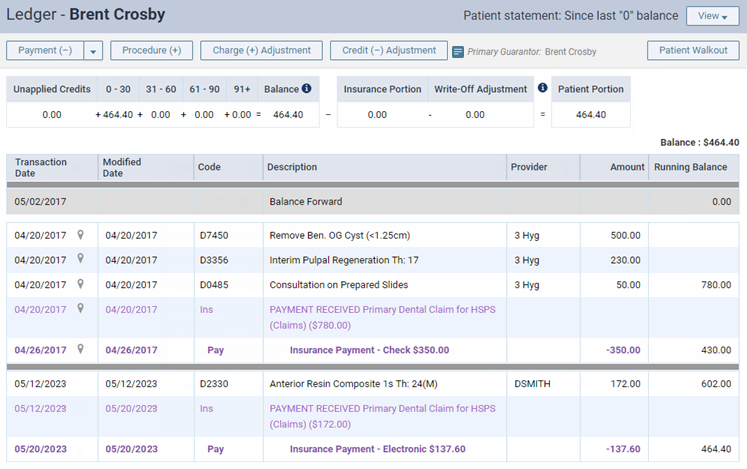
On the Patient menu, under Financial, select Ledger.
The patient's Ledger page opens.
-
-
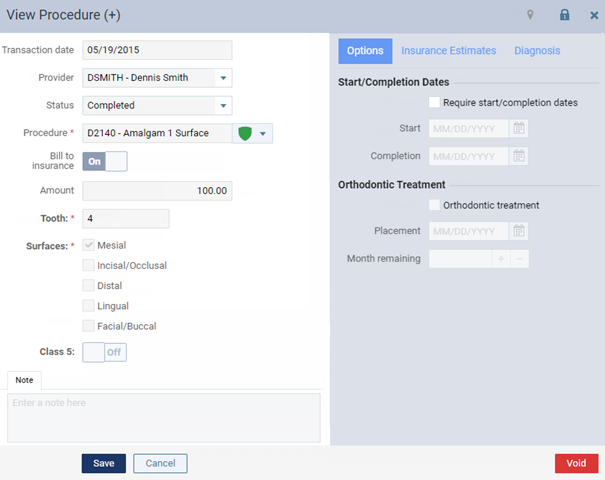
Click (or tap) a procedure, payment, or adjustment in a closed period.
The applicable "View" dialog box appears.
-
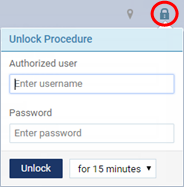
Click (or tap) the Unlock icon.
-
In the Authorized user and Password boxes, enter your credentials if you have permission to unlock transactions, or have a person who has been granted permission to unlock transactions enter his or her credentials.
Note: To unlock the transaction, the specified user must also have the "Review Ledger Options" and "Manage Ledger Options" security rights.
-
Select the length of time that you want this transaction to remain unlocked.
-
Click (or tap) Unlock.
Note: An unsuccessful attempt to unlock a transaction will appear in the audit log, and an email with be sent to the email address associated with the user name used in the attempt.