Saving a credit card on file after completing a patient form
With Dentrix Ascend Forms and Dentrix Ascend Pay, after a patient completes forms online, there is an option to save a card on file with the office if a certain setting for patient forms has been enabled. Having cards on file before patients' appointments reduces front desk friction, minimizes manual entry errors, and provides touchless payment capabilities.
Notes:
-
There is no additional cost to provide this functionality if your office uses Dentrix Ascend Pay (through Worldpay).
-
The workflow is fully PCI-DSS compliant, leveraging Worldpay's hosted solution for all sensitive data handling.
-
No card data is stored in Dentrix Ascend.
To save a card on file (patient does this)
-
The patient (or the patient's representative) completes and submits the requested online forms.
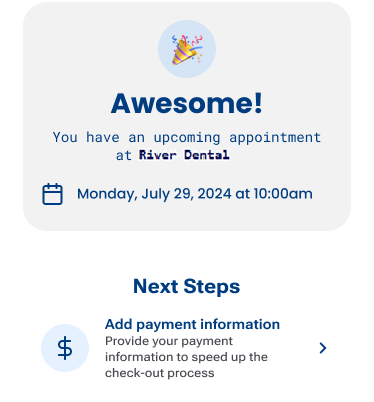
A completion message appears.
-
The patient clicks (or taps) Add payment information.
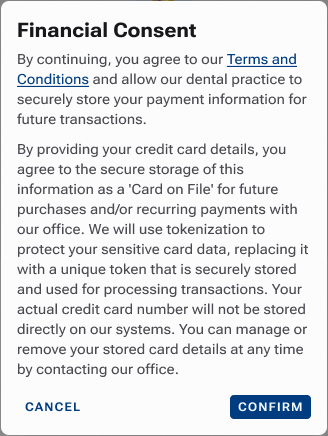
The Financial Consent message appears.
-
The patient clicks (or taps) Confirm.
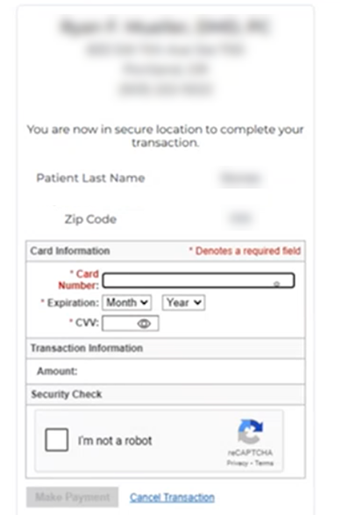
The page for entering credit card details appears.
-
The patient specifies the card information, completes the security check, and then clicks (or taps) Make Payment.
Notes:
-
Worldpay collects the card details and performs a $0.00 authorization.
-
Worldpay tokenizes the card and returns a token to Dentrix Ascend, where it is associated with the patient's record.
-