Removing medications from patients
You can remove a patient's medications as needed.
Note: Alternatively, you can expire the medication. An expired medication remains in the patient's record but is inactive.
To remove a patient's medication
-
If the correct patient is not already selected, use the Patient Search box to access the patient's record.

-
Do one of the following:
-
If the patient has any medical alerts, the Medical Alerts icon in between the Patient menu and the Patient Search box is a red plus sign. Click (or tap) the Medical Alerts icon.

The Patient Information page opens with Medical Alerts/Medications selected on the navigation panel (on the left).
Proceed to step 3.
-
If the patient's Overview page is not already open, on the Patient menu, under General, select Overview. The patient's Overview page opens. The Medications tab of the Medical Alerts/Medications box displays any medications that have been entered for the patient. Select a medication.
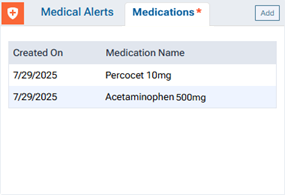
The Patient Information page opens with Medical Alerts/Medications selected on the navigation panel (on the left), and the Edit Medication dialog box appears.
Skip to step 4.
-
If the patient's Overview page is not already open, on the Patient menu, under General, select Overview. The patient's Overview page opens. Click (or tap) the Medical Alerts/Medications box.
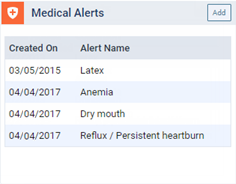
The Patient Information page opens with Medical Alerts/Medications selected on the navigation panel (on the left).
Proceed to step 3.
-
On the Patient menu, under General, select Medical Alerts. The Patient Information page opens with Medical Alerts/Medications selected on the navigation panel (on the left).
Proceed to step 3.
-
On the Patient menu, under General, select Patient Information. The patient's Patient Information page opens. Select Medical Alerts/Medications on the navigation panel (on the left).
Proceed to step 3.
-
-
Select a medication.
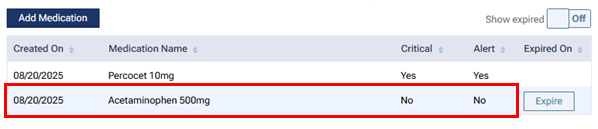
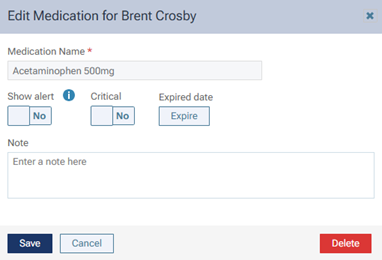
The Edit Medication dialog box appears.
-
Click (or tap) Delete.
A confirmation message appears.
-
Click (or tap) Delete.