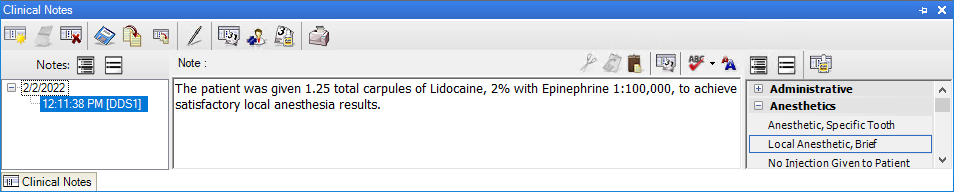
Clinical notes are free-form notes that you can enter at any time. Clinical notes provide you with a method of entering exam notes that are not specific to a procedure. Once you sign a clinical note or move it to history, you cannot edit or delete it. However, you can add an addendum to a clinical note in history.
The Clinical Notes panel consists of toolbars, the date and time stamp list, the clinical note text box, and the template list.
To learn more, click the following links:
The Clinical Notes panel toolbars
Adding clinical notes using templates
Creating clinical notes templates
Editing clinical notes templates
Setting up clinical notes template categories
Renaming clinical notes template categories
Deleting clinical notes template categories
Creating clinical notes prompts
Editing clinical notes prompts
Adding an addendum to clinical notes
Copying clinical notes to other programs
Adding digital signatures to clinical notes
Repositioning the Clinical Notes panel