
Connection method settings
You can specify the type of connection you are using in your office to submit eclaims.
To indicate a connection method
In the eTrans Setup dialog box, under Connection Method, select the connection method that applies to your office:
Internet - Select this connection method if you have any type of Internet connection in your office, such as DSL, cable, or other high-speed connection, or dial-up Internet access.
Dial-up - Select this connection method if you do not have any type of Internet connection in your office, and you are going to connect through an eServices department server.
If you selected "Dial-up" as your connection method, click eTrans Dial-up Settings.
The eTrans Dial-up Settings dialog box appears.
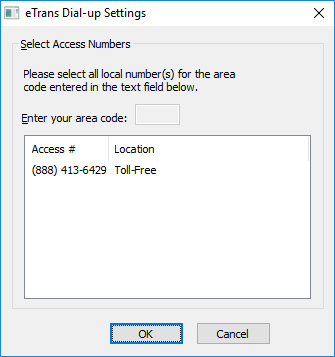
Enter your office's area code and select the numbers that you want to use to connect to the eTrans server when you send your e-claims.
Click OK.
Need more help?
You can visit our website or contact OMSVision Customer Support.