
Advanced options
You can view and change advanced eTrans transmission options.
To change the advanced options
In the eTrans 4.6 Setup dialog box, click Show Advanced>>.
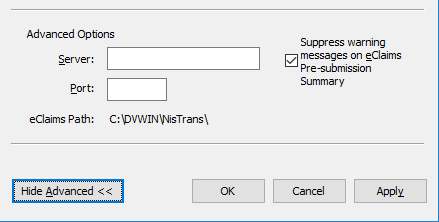
With the dialog box expanded to show the advanced options, set up the following settings:
Server - This field displays the name of the eTrans server to which you are connecting to send your eclaims. Do not change this information.
Port - This field displays the port number through which you are connecting to the eTrans server to send your eclaims. Do not change this information.
eClaims Path - This is the path where your eTrans program files are saved on your computer.
Suppress Warning Messages on eClaims Pre-submission Summary - If you do not want to be notified if there are problems with your eclaims, select this option to have eTrans suppress warning messages on Pre-submission Summary reports.
Click Hide Advanced << to hide the advanced options.
Need more help?
You can visit our website or contact OMSVision Customer Support.