
In a patient's Medical Alerts record, you can specify the smoking status of that patient.
Note: You can also specify a patient's smoking status while you are performing a medical history review for the patient.
To specify a smoking status
In the Medical Alerts dialog box, click the smoking status button  (the name and icon vary depending on the current status).
Note: If a smoking status has never been specified for the patient, the smoking status is "Never smoked tobacco" by default.
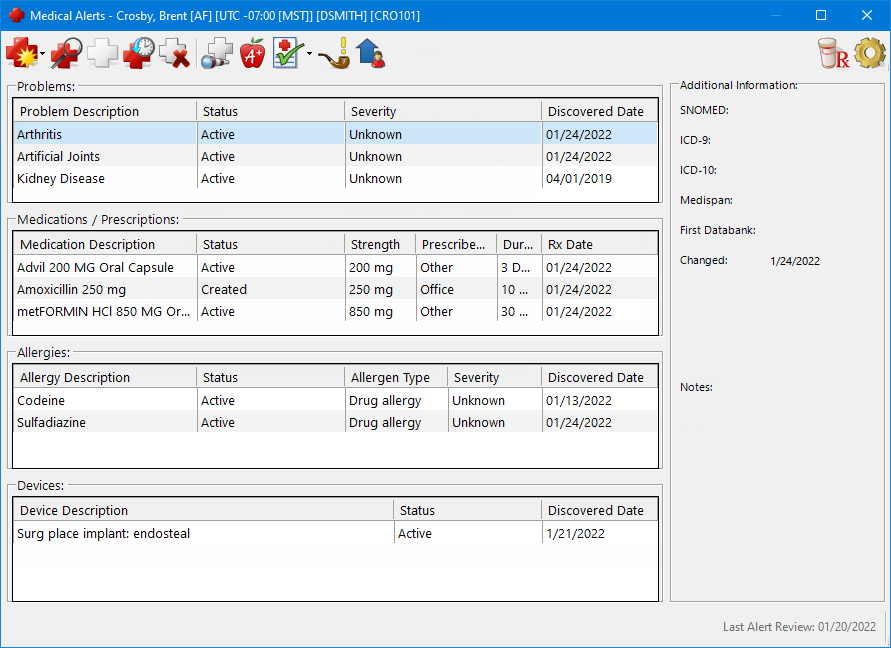
The Select Smoking Status dialog box appears.
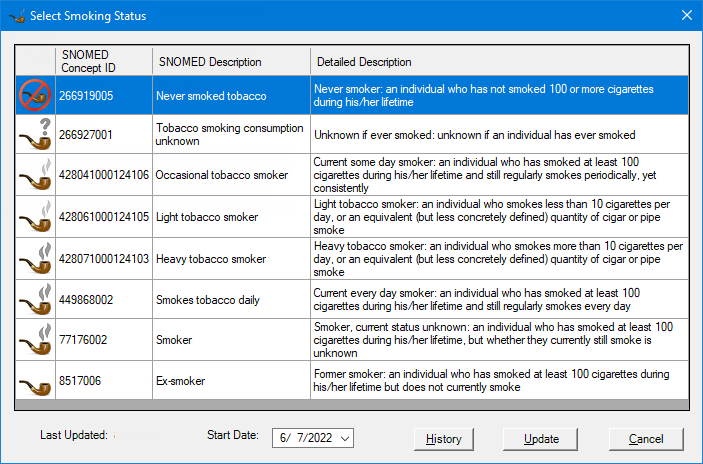
Select a status:
Traditional; Ceremonial; Ritual; Tobacco use - Uses tobacco traditionally, ceremonially,or ritually.
Never used tobacco (cigar, cigarette, e-cigarette, vaping) - Has never smoked or smoked less than 100 cigarettes in lifetime.
Tobacco use consumption unknown - Unknown if ever has smoked.
Thinking about stopping - Current smoker who is interested in quitting.
Not interested in stopping - Current smoker who does not want to quit.
Cannabis (substance) use - Uses cannabis substance.
Occasional tobacco smoker - Has smoked 100 or more cigarettes in lifetime and still does periodically but consistently.
Light tobacco smoker (10 or less per day) - Smokes fewer than 10 cigarettes (or equivalent) per day.
Heavy tobacco smoker (over 20 per day) - Smokes more than 10 cigarettes (or equivalent) per day.
Failed attempt to stop smoking - Current smoker who tried but failed to stop smoking.
Smokes tobacco daily - Has smoked 100 or more cigarettes in lifetime and still smokes daily.
Moderate smoker (20 or less per day) - Smokes 20 or fewer cigarettes per day.
Cigar smoker - Has smoked at least 100 cigars in lifetime, but it is unknown if still smokes.
User of smokeless tobacco - Has used smokeless tobacco at least 100 times in lifetime, and regularly uses it.
E-cigarette user (includes Vaping) - Uses e-cigarettes or vapes.
Smoker - Has smoked 100 or more cigarettes in lifetime but currently unknown if still smokes.
Ex-smoker (cigar, cigarette, e-cigarette, vaping) - Has smoked 100 or more cigarettes in lifetime but does not currently smoke.
To specify the Start Date of the smoking status, do one of the following:
To enter a date, do any of the following:
To change the month, click the month portion of the date and then enter a month as a 1-digit or 2-digit number.
To change the day, click the day portion of the date and then enter a day as a 1-digit or 2-digit number.
To change the year, click the year portion of the date and then enter a year as a 2-digit or 4-digit number.
To select a date, do the following:
Click the down-pointing arrow to view a month calendar.
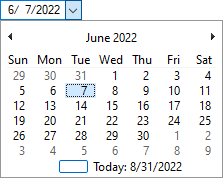
Navigate to the correct month using the left and right arrows.
Note: To quickly change the year and month, click the month-year at the top of the calendar, navigate to the correct year using the left and right arrows, and then click the correct month.
Click the correct day.
Click Update.