Viewing signed future payment plan agreements
When you are creating a future payment plan (from the patient's ledger or treatment plan), during the Finalize and Pay step, you can choose to send the contract to the patient's online forms portal so it can be signed (on the Agreement Options menu, select Send To Patient). After the contract has been signed and submitted, an entry for the signed agreement appears in the location's Inbox and in the patient's record.
To view signed agreements
Do any of the following:
-
View signed agreements in a location's Inbox:
-
If you are not already viewing the correct location, select it on the Location menu.
-
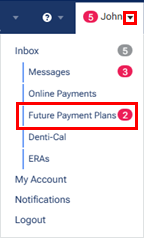
On the User menu, select Future Payment Plans.
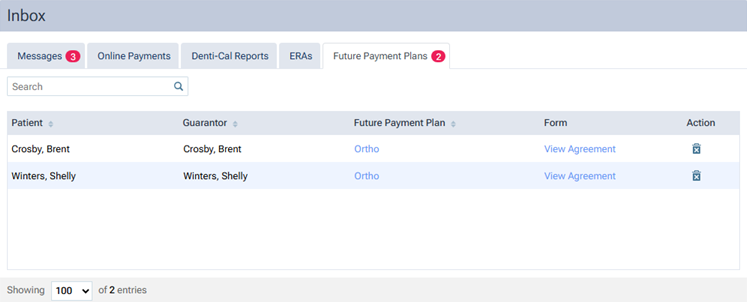
The location's Inbox page opens with the Future Payment Plans tab selected. Any signed agreements that have been received appear.
-
For any inbox item, do any of the following:
-
To view the plan details, click the plan name, which is a link, in the Future Payment Plan column.
-
To view the signed agreement, which has been saved in the patient's document manager, click the View Agreement link in the Form column. A PDF document opens on a new browser tab.
-
To remove the item from the Inbox, click the trash can icon
 in the Action column. On the confirmation message that appears, click Delete. The count for the number of received agreements decreases.
-
-
-
View an agreement in a patient's record:
-
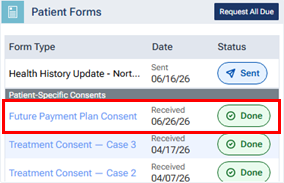
On the patient's Overview page, in the Patient Forms box, a signed or requested agreement (named "Future Payment Plan Consent") appears under Patient-Specific Consents. The Received (or Sent) date and "Done" (or "Sent") status indicator for the agreement appear for your reference.
-
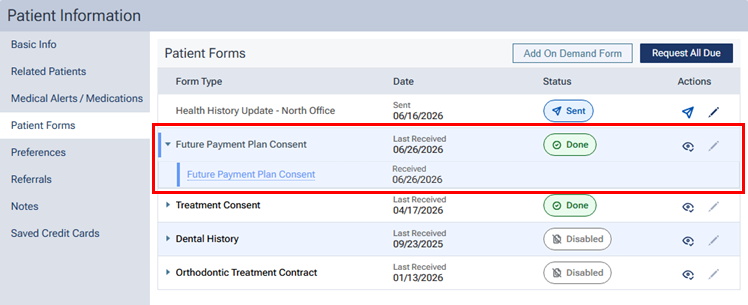
In the Patient Forms section of the patient's Patient Information page, a signed or requested agreement (named "Future Payment Plan Consent") appears in the Future Payment Plan Consent category (which you must expand to see the agreement). The Received (or Sent) date and "Done" (or "Sent") status indicator for the agreement appear for your reference.
-
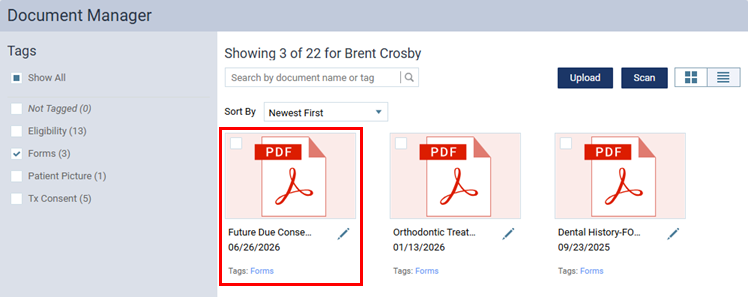
In a patient's document manager, a signed agreement (named "Future Payment Plan Consent") appears. By default, the date of the agreement is the received date, and the agreement has the "Forms" tag attached to it.
-