Recording vital signs
You can enter a patient's vital signs as needed. Any of the following measurements can be recorded: blood pressure, heart rate, temperature, oxygen saturation, height, weight, blood glucose, hemoglobin A1c, LDL cholesterol, HDL cholesterol, total cholesterol, triglycerides, high-sensitivity C-reactive protein, forced vital capacity, forced expiratory volume in one second, FEV1/FVC ratio, and peak expiratory flow.
To record vitals signs for a patient
-
If the correct patient is not already selected, use the Patient Search box to access the patient's record.

-
Do one of the following:
-
If the patient has any medical alerts, the Medical Alerts icon in between the Patient menu and the Patient Search box is a red plus sign. Click (or tap) the Medical Alerts icon.

The Patient Information page opens with Medical Alerts/Medications selected on the navigation panel (on the left).
-
If the patient's Overview page is not already open, on the Patient menu, under General, select Overview. The patient's Overview page opens. Click (or tap) the Medical Alerts/Medications box.
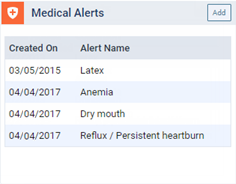
The Patient Information page opens with Medical Alerts/Medications selected on the navigation panel (on the left).
-
On the Patient menu, under General, select Medical Alerts. The Patient Information page opens with Medical Alerts/Medications selected on the navigation panel (on the left).
-
On the Patient menu, under General, select Patient Information. The patient's Patient Information page opens. Select Medical Alerts/Medications on the navigation panel (on the left).
-
-
Click (or tap) Add Vital Signs/Readings.

The Add Vital Signs/Readings dialog box appears.
-
Specify vital signs on the following tabs as needed:
-
Core Health Metrics:
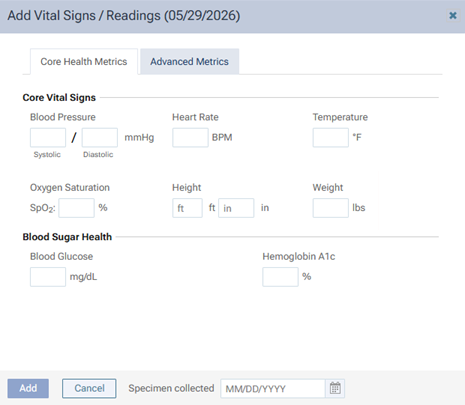
Specify any of the following options as needed:
-
Blood Pressure - The patient's blood pressure (systolic and diastolic; up to three digits each).
Note: The unit of measure is millimeters of mercury (mmHg).
-
Heart Rate - The patient's heart rate (up to three digits).
Note: The unit of measure is beats per minute (BPM).
-
Temperature - The patient's temperature (up to three digits for the whole number, a decimal point, and one digit after the decimal).
Notes:
-
The unit of measure is degrees Fahrenheit (°F).
-
If you do not enter a digit after the decimal point, 0 will be added automatically for you.
-
-
Oxygen Saturation - The patient's oxygen saturation level (up to three digits).
Note: The unit of measure is a percentage (SpO2 %, which represents the peripheral oxygen saturation).
-
Height - The patient's height (for "ft," up to two digits; for "in," up to two digits for the whole number, and optionally, a decimal point and one digit after the decimal).
Notes:
-
The units of measure are feet (ft) and inches (in).
-
If you enter a value for "in," a value for "ft" is required. If you enter a value for "ft," a value for "in" is not required.
-
-
Weight - The patient's weight (up to three digits for the whole number, and optionally, a decimal point and one digit after the decimal).
Note: The unit of measure is pounds (lbs).
-
Blood Glucose - The patient's blood glucose level (up to three digits).
Note: The unit of measure is milligrams per deciliter (mg/dL).
-
Hemoglobin A1c - The patient's hemoglobin A1c level (up to two digits for the whole number, a decimal point, and one digit after the decimal).
Notes:
-
The unit of measure is a percentage (which represents the average blood glucose level over time).
-
If you do not enter a digit after the decimal point, 0 will be added automatically for you.
-
-
-
Advanced Metrics:
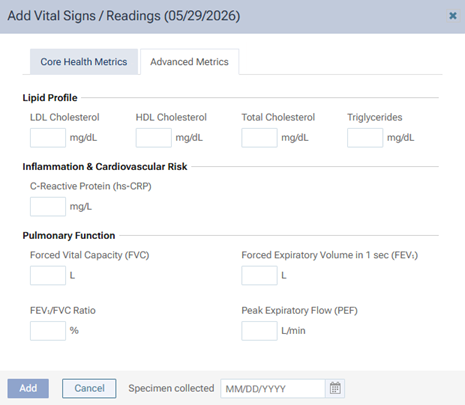
Specify any of the following options as needed:
-
LDL Cholesterol - The low-density lipoprotein level in the patient's blood (up to four digits).
Note: The unit of measure is milligrams per deciliter (mg/dL).
-
HDL Cholesterol - The high-density lipoprotein level in the patient's blood (up to four digits).
Note: The unit of measure is milligrams per deciliter (mg/dL).
-
Total Cholesterol - The overall amount of cholesterol in the patient's blood (up to four digits).
Note: The unit of measure is milligrams per deciliter (mg/dL).
-
Triglycerides - The triglyceride level in the patient's blood (up to five digits).
Note: The unit of measure is milligrams per deciliter (mg/dL).
-
C-Reactive protein (hs-CRP) - The very low levels of the C-reactive protein in the patient's blood (up to three digits for the whole number, and optionally, a decimal point and up to two digits after the decimal).
Note: The unit of measure is milligrams per liter (mg/L).
-
Forced Vital Capacity (FVC) - The total volume of air the patient can forcefully and completely blow out after taking the deepest breath possible (up to two digits for the whole number, and optionally, a decimal point and up to two digits after the decimal).
Note: The unit of measure is liters (L).
-
Forced Expiratory Volume in 1 sec (FEV1) - The volume of air the patient can forcefully exhale in the first second of a single deep breath (up to two digits for the whole number, and optionally, a decimal point and up to two digits after the decimal).
Note: The unit of measure is liters (L).
-
FEV1/FVC Ratio - The percentage of the patient's total lung capacity that he or she can forcefully exhale in just one second (up to two digits for the whole number, and optionally, a decimal point and up to two digits after the decimal).
Note: The unit of measure is a percentage.
-
Peak Expiratory Flow (PEF) - The maximum speed at which the patient can exhale air from his/her lungs (up to four digits).
Note: The unit of measure is is liters per minute (L/min).
Note: If you have entered any measurements on the Advanced Metrics tab, for this vital signs entry in the vital signs/readings list in the patient's record (in the Medical Alerts/Medications section of the Patient Information page), the number of values entered appears in the Advanced column.

-
-
-
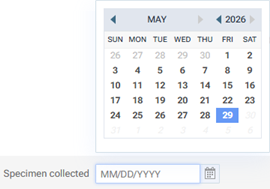
Regardless of which tab is selected, if you know the date the specimen was collected, click (or tap) in the Specimen collected box, and then select the date on the calendar that appears.
-
Click (or tap) Add.