Pearl tab
On the Pearl tab of the AI panel (the panel on the right), a summary of the AI analysis performed on the displayed teeth (using all images, with those same teeth in common, that were acquired during that visit—in the same series) appears.
Notes:
-
This tab is available only if Pearl AI has been activated, and the image being viewed is eligible for AI findings.
-
If this tab available, it is selected by default for each patient (when you start a new image-viewing session for that patient).
-
Depending on the width of the AI panel, the tab's name may be hidden, leaving only an icon to identify the tab.
To use the Pearl tab
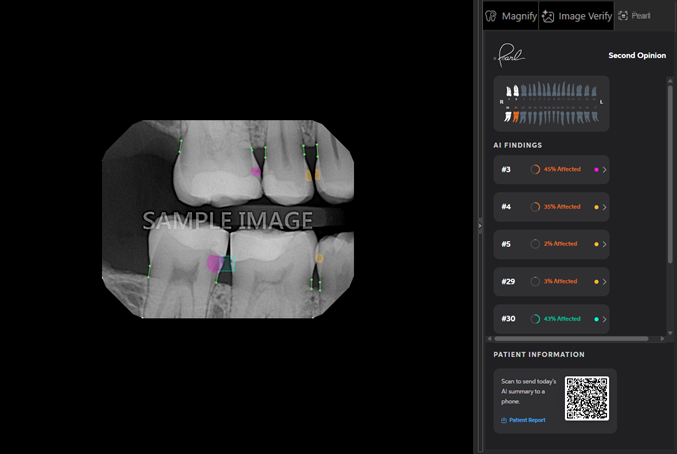
The following appear:
-
The odontogram at the top displays the teeth that may require restorative procedures in an orange color.
-
The AI FINDINGS displays how much each tooth is affected.
To share the AI findings with the patient, the following options are available:
-
QR code - Have the patient use his or her mobile phone to scan the QR code and visit the corresponding webpage. Alternatively, you can scan the QR code with an office-owned mobile device, copy the webpage URL, and then email the link to the patient.
-
Link - Click the Patient Report link to download the document and then print it or email it to the patient.