Customizing X-ray series for Simple Mode acquisitions
If you are using the Modality view, you can customize the procedures for Simple Mode acquisitions of intraoral X-ray series.
To customize X-ray series
-
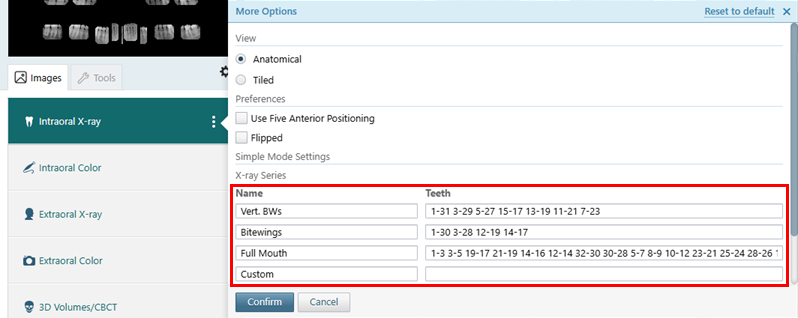
With the Intraoral X-ray tab selected, click (or tap) the More Options button (three vertical dots):
-
Under X-ray Series, customize any of the series (which are "Vert. BWs," "Bitewings," "Full Mouth," and "Custom" by default) as needed:
-
Name - The name to identify the series.
-
Teeth - The tooth numbers for each image in the series. For each tooth range, enter the first and last tooth number separated by a dash. Each range must be separated by a space. Each range corresponds to a step in the acquisition sequence.
Notes:
-
For a tooth range that includes teeth in both arches, type the upper-left-most tooth number, a dash (-), and then the lower-right-most tooth number. For example, type 1-30 for teeth 1, 2, 3, 32, 31, and 30.
-
For any of the first three series, if you do not specify any teeth, the default name and teeth will be used for acquisitions.
-
For the fourth series, if you do not specify any teeth, the series will not be available for acquisitions.
-
You can put all four series in any order.
-
To reset all options (View, Preferences, and X-ray Series) to the system defaults, click the Reset to default link (in the upper-right corner of the menu).
-
-
Click (or tap) Confirm.