Creating alias procedure codes
Procedure codes represent the services that you render and products that you sell. Your Dentrix Ascend practice database comes with all the current ADA Procedure Codes, which are updated automatically as needed, but you can create alias procedure codes for your organization. An alias code is a procedure code followed by a period (.) and then a custom alphanumeric value up to five characters in length. Having an alias code (alternate code) allows you to have duplicate procedures in your organization's database, so you can, for example, charge different rates for similar procedures but have the same ADA Procedure Code show on claims.
Notes:
-
When you add an alias procedure code, Dentrix Ascend automatically adds it to every fee schedule in all locations of your organization.
-
The fee for the newly created alias procedure code in the current location's preferred fee schedule will be populated with the default fee specified for the alias procedure code.
-
In each of the other fee schedules across all locations, one of the following will occur (depending on whether fee inheritance for alias procedure codes is enabled for your organization or not):
-
The fee for the newly created alias procedure code will be populated with the fee from the original procedure code (the procedure code that the alias procedure code is based on) in that fee schedule, but you can change the fee for the alias procedure code in that fee schedule if necessary. Also, the "No Write-off" flag (if set) and the "Paid in Full" flag (if set) are applied to the alias procedure code in that fee schedule.
-
The fee for the newly created alias procedure code will be populated with $0.00, so you must manually specify a fee for the alias procedure code in that fee schedule.
-
To create an alias procedure code
-
If you are not already viewing the correct location, select it on the Location menu.
-
On the Settings menu, under Production, select Procedure Codes & Conditions.
The Procedure Codes & Conditions page opens.
-
On the Procedure Codes tab, click (or tap) Add Procedure Code.

Note: You may want to verify that the procedure code that you want to add does not already exist before attempting to add it. You can do this before or after clicking (or tapping) Add Procedure Code. To do it before, with All selected in the View list, type a code or description in the Search for specific procedure box.
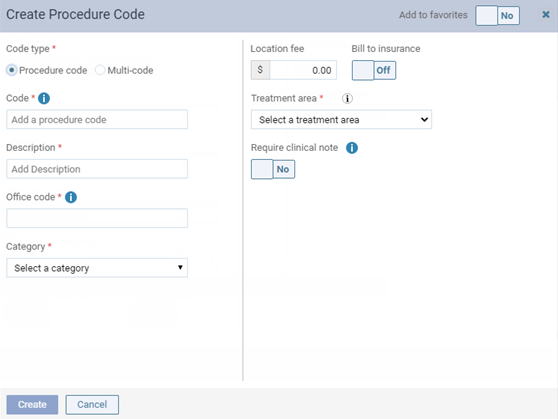
The Create Procedure Code dialog box appears.
-
Leave Procedure code selected as the Code type. You cannot change the code type once you save the procedure.
-
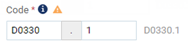
Enter the Code of an existing procedure, and then enter a suffix for the code (for example, if you want to create an alias code for D0330, you can create a procedure with "1" as the suffix) in the additional box that appears. You cannot change the code once you save the procedure code.
-
Set up the other options as explained in the topic about adding procedure codes.
-
Click (or tap) Create.
Important: You may need to verify or update the fee for the alias procedure code in all fee schedules across all locations (except in the current location's preferred fee schedule).