Controlling the automatic importing of insurance information
With an Eligibility Pro subscription, when a response is received for an eligibility request, insurance information can be imported into Dentrix Ascend automatically. Insurance information that can be imported for a plan includes deductible and benefit details, coverage exception details, certain plan settings, and the coverage table. At any time, if you need to stop Dentrix Ascend from automatically importing insurance information to prevent the automatic updating of, for example, coverage tables, you can turn off the automatic-import setting for any location.
Notes:
-
This functionality can be enabled or disabled for each location (with an Eligibility Pro subscription) separately.
-
With this functionality enabled, for insurance information to be imported automatically, the following criteria must be met:
-
The payer must be supported. The payer must return a single network of benefits. Currently, only MetLife is supported.
-
The plan's group number returned by the payer must match the plan's group number in Dentrix Ascend. If the payer does not return a group number, if a group number does not exist in Dentrix Ascend, or if the group number in the response does not match the group number in Dentrix Ascend, the automatic import will not occur.
-
The plan must be "In Network."
-
To control the automatic importing of insurance information for a location
-
If you are not already viewing the correct location, select it on the Location menu.
-
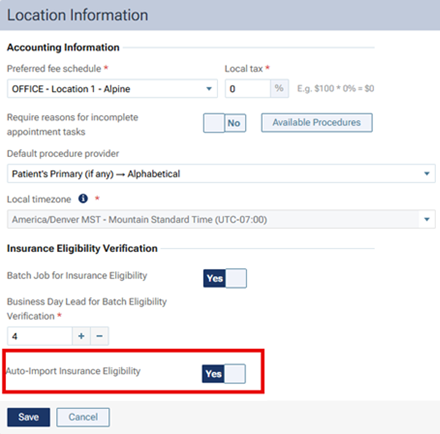
On the Settings menu, under Location, select Location Information.
The Location Information page opens.
-
On the Basic Info tab, set the Auto-Import Insurance Eligibility switch to one of the following states:
-
Yes to allow automatic importing.
-
No to prohibit automatic importing.
Note: Turning off automatic importing does not prevent you from making manual changes to coverage tables. It only prevents or stops Dentrix Ascend from automatically updating insurance information based on eligibility responses.
Notes:
-
The Auto-Import Insurance Eligibility switch is available only if an Eligibility Pro subscription is associated with the location.
-
The following types of information can be imported automatically:
-
Deductibles and benefits.
-
Coverage percentages.
-
Coverage exceptions.
-
Other plan options (source of payment, coordination of benefits method, missing tooth clause, and crowns/bridges paid on).
-
-
During an automatic import, one of the following occurs for each value:
-
If the value in the response is null or does not exist, the corresponding value in Dentrix Ascend is not updated.
-
If the value in the response matches the corresponding value in Dentrix Ascend, the value in Dentrix Ascend is not updated.
-
If the value in the response differs from the corresponding value in Dentrix Ascend, the value in Dentrix Ascend is updated.
-
-
If an automatic import fails, the manual import workflow is available.
-
-
Click (or tap) Save.