
Demandforce Local is a searchable directory designed to increase your online visibility and allow consumers in your local area to discover your business. All the network activity Patient Engage generates for you is tracked.
To access Demandforce Local
2. From the Dentrix Hub toolbar, click Settings.
3. Under Manage, click Demandforce Local.
4. Make sure the On option is selected under Demandforce Local.
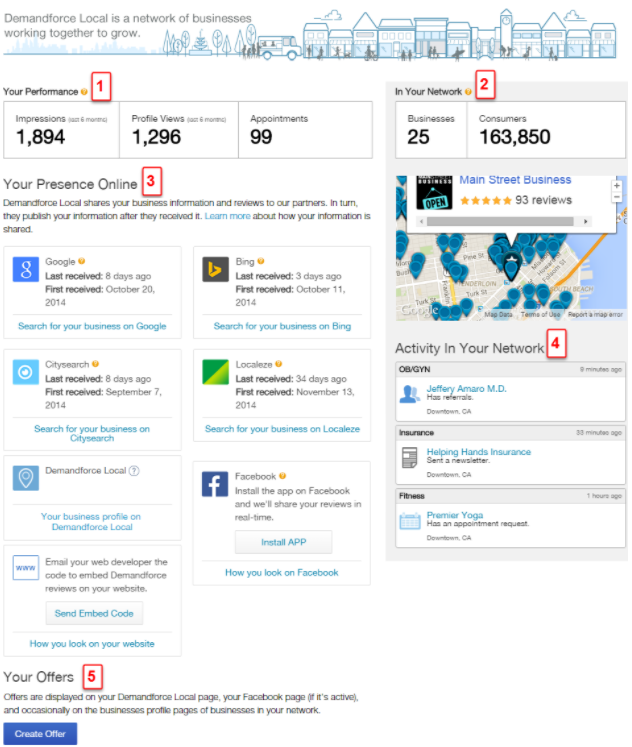
Here is a breakdown of what it means:
Section 1 - Your Performance identifies the network activity of your specific business.
Impressions: The number of times (in the last 6 months) your business information has appeared on other local businesses' profile page. These businesses will always serve in industries other than your own.
Profile Views: The number of times online consumers have viewed your business profile page.
Appointments: The number of appointments captured through our system's online scheduling feature. These include appointment widgets on your business profile page, and, if installed, your Facebook business page.
Section 2 - In Your Network provides you with the number of our businesses and consumers in your local area. It also includes a map that shows you where other non-competing businesses are, so you can network and cross promote with them.
Section 3 - Your Presence Online displays the different places where your information is fed. Some of these sources include your reviews. You can also install our Facebook app to share your reviews on your Facebook page in real time, or get the embed code to show reviews on your website.
Section 4 - Activity In Your Network displays the network activity of local non-competing businesses in your area, so you can see how well our system is working for them, as well.
Section 5 - Your Offers lists the online specials you are currently offering through our system, along with a summary of the activity generated from them.
To get the best results from Demandforce Local, make sure you’ve filled out all of the information your Business Profile (Settings>Business Profile). We’ll automatically begin sending your business data to more than 90 internet sites and directories, and we'll alert you when an appointment and review comes into your portal.