
The primary goal of a continuous assessment of a patient's oral health status (OHS) is to reduce the likelihood of a patient suffering a preventable urgent or life-threatening oral health condition. Most dental "emergencies" are due to an acute flare-up of an existing condition—usually a periapical or periodontal abscess.
From the standpoint of overall healthcare system cost effectiveness, this prevention-oriented program, which provides a way to record and track oral health, leading to early diagnosis and timely intervention, should decrease the number of emergency room visits for evaluation and/or treatment of serious oral infections.
From a program implementation perspective, the OHS survey makes the process of entering OHS metrics as efficient and consistent as possible. The simplified objective data collection and criteria may also prove to be appropriate for oral assessments done in "visual exam only" scenarios, which may increase its use in non-clinical, oral health evaluation settings.
OHS classifications (a classification is current if an OHS survey has been done within the past 24 months):
OHS 1 - Excellent. No dental treatment is required.
OHS 2 - Moderate/Good. The patient has moderate dental treatment needs.
OHS 3 - Compromised. Urgent dental treatment is indicated.
OHS 4 - Poor. Very urgent dental treatment is indicated.
OHS 5 - Poor. For a class 4 patient, it has been 24-36 months since the last completed OHS survey.
Note: This classification allows you to track class 4 patients for another 12 months for continued identification and, therefore, treatment.
OHS 6 - Unknown. One of the following conditions is met:
The patient does not have a completed OHS survey.
For a class 1, 2, or 3 patient, it has been 24 months since the last completed OHS survey.
For a class 5 patient, it has been 36 months since the last completed OHS survey.
Note: OHS surveys are available only if a certain global setting is enabled.
To enter or update OHS
If the patient has a prior completed OHS survey, a message appears and displays the date of that OHS survey and the classification that was calculated from that survey. Proceed to step 2; otherwise, skip to step 3.
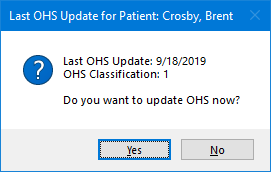
To update the OHS, click Yes.
The OHS Oral Health Status dialog box appears.
Patient does not have a completed OHS survey
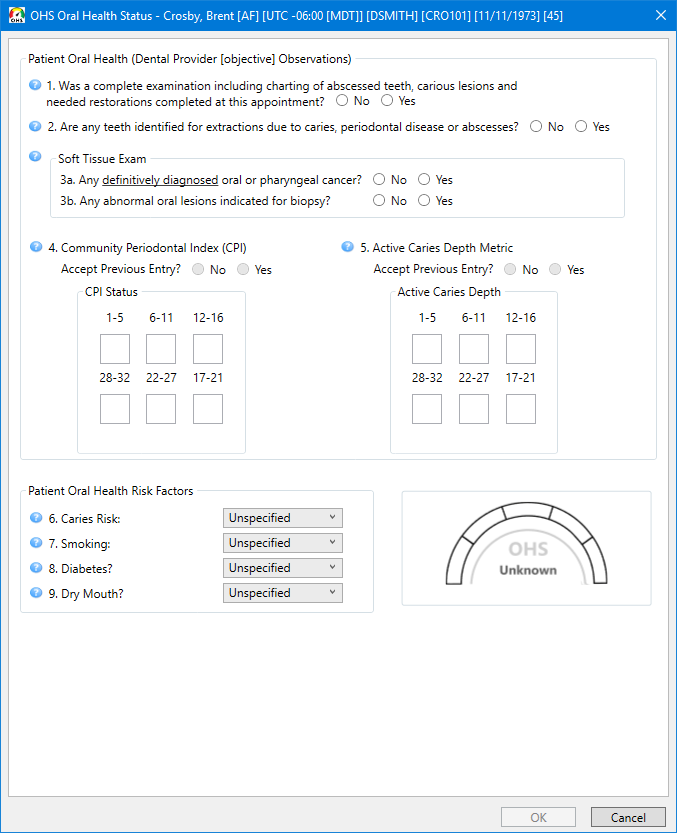
Patient has a prior completed OHS survey
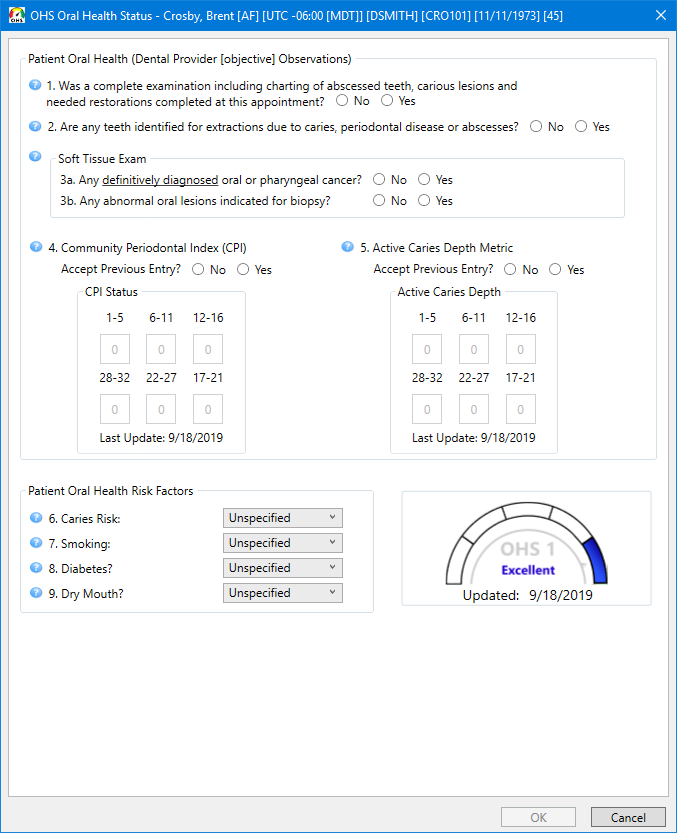
Enter responses for the following:
#1 Was a complete examination including charting of abscessed teeth, carious lesions and needed restoration completed at this appointment? - Select No or Yes.
Notes:
Charting of all conditions is not required. Treatment planning of proposed procedures by specific appointments is not required. An immediate treatment/restoration query applies to caries-related procedures and elective (non-caries related) restorative, endodontic, surgical, or prosthetic procedures.
Your response does not affect the overall OHS status.
If you select No, other options become available.
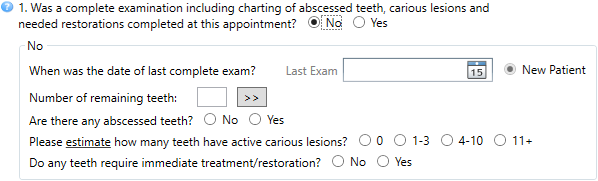
When was the date of last complete exam? - Enter or select the Last Exam date.
Note: You cannot select New Patient manually, so it is always unavailable. New Patient is selected automatically if the patient does not have a prior completed survey or a survey was not completed on the specified Last Exam date.
Number of remaining teeth - Enter
a value, or click the search button  to select
the missed teeth (the correct number of remaining teeth will be inserted
into the Number of remaining teeth
box automatically).
to select
the missed teeth (the correct number of remaining teeth will be inserted
into the Number of remaining teeth
box automatically).
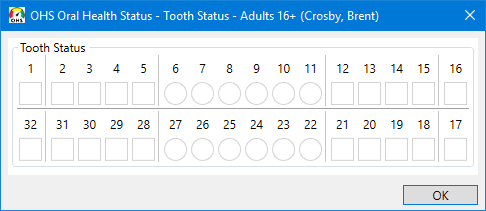
Note: The options in the tooth selection dialog box vary according to the age of the patient.
Are there any abscessed teeth? - Select No (class 1) or Yes (class 4).
Please estimate how many teeth have active carious lesions? - Select all that apply: 0 (class 1), 1-3 (class 2), 4-10 (class 3), and 11+ (class 4).
Do any teeth require immediate treatment/restoration? - Select No (class 1) or Yes (class 4).
Note: If you select Yes for this survey, if No is selected for the next survey, the current date will be inserted as the Last Exam date.
If you select Yes, other options become available.
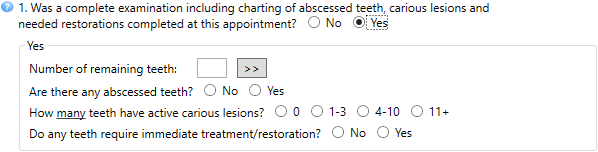
Number of remaining teeth - Enter
a value, or click the search button to select the
missed teeth (the correct number of remaining teeth will be inserted into
the Number of remaining teeth box automatically).
Note: The options in the tooth selection dialog box vary according to the age of the patient.
Are there any abscessed teeth? - Select No (class 1) or Yes (class 4).
How many teeth have active carious lesions? - Select all that apply: 0 (class 1), 1-3 (class 2), 4-10 (class 3), and 11+ (class 4).
Do any teeth require immediate treatment/restoration? - Select No (class 1) or Yes (class 4).
Note: If you select Yes for this survey, if No is selected for the next survey, the current date will be inserted as the Last Exam date.
#2 Are any teeth identified for extractions due to caries, periodontal disease or abscesses? - Select No or Yes.
Note: This includes any teeth that are recommended for extraction due to problematic exfoliation (deciduous teeth), non-restorable caries, periodontal bone loss, periodontal or periapical abscess, or any other non-elective reason. This includes third molars with probability for urgent treatment within 24 months.
#3 Soft Tissue Exam:
#3a Any definitively diagnosed oral or pharyngeal cancer? - Select No or Yes.
#3b Any abnormal oral lesions indicated for biopsy? - Select No or Yes.
Note: A Yes response to oral or pharyngeal cancer requires definitive diagnosis by biopsy.
#4 Community Periodontal Index (CPI):
If there is a prior OHS survey for the patient, Accept Previous Entry? is available, and the community periodontal indexes (CPI) that were entered in the previous survey appear. If no changes are needed, select Yes. To update any of the entries, select No, and then enter the one of the following community periodontal indexes for the applicable sextants:
X - No teeth in sextant.
0 - No pockets > 3.5mm (black band fully visible).
1 - No pockets > 3.5mm, bleeding on probing (black band fully visible).
2 - No pockets > 3.5mm, calculus present (black band fully visible).
3 - Pocket > 3.5mm but < 5.5mm (black band partially visible).
4 - Pocket > 5.5mm (blank band not visible).
If there is not a prior OHS survey for the patient, Accept Previous Entry? is not available. Enter one of the following community periodontal indexes for each sextant:
X - No teeth in sextant.
0 - No pockets > 3.5mm (black band fully visible).
1 - No pockets > 3.5mm, bleeding on probing (black band fully visible).
2 - No pockets > 3.5mm, calculus present (black band fully visible).
3 - Pocket > 3.5mm but < 5.5mm (black band partially visible).
4 - Pocket > 5.5mm (blank band not visible).
The class is determined according to the following criteria:
Class 1 - No more than one CPI score of 3 and no CPI score of 4.
Class 2 - Three or fewer CPI scores of 3 and no CPI score of 4.
Class 3 - Four or more CPI scores of 3 and three or fewer CPI scores of 4.
Class 4 - Four or more CPI scores of 4.
Notes:
Third molars are excluded unless they are in the functional position of second or first molars. As a general rule for scoring, if in doubt, enter the lower score. When heavy extrinsic stain is present in the absence of calculus or pockets, the sextant may be scored as 2 if dental services are needed to remove the stains.
The CPI options are available only if the patient is 15 years old or older.
#5 Active Caries Depth Metric:
If there is a prior OHS survey for the patient, Accept Previous Entry? is available, and the active caries depths that were entered in the previous survey appear. If no changes are needed, select Yes. To update any of the entries, select No, and then enter one of the following active caries depths for the applicable sextants:
X - All teeth in sextant are missing.
0 - No caries are present in sextant.
1 - Caries present; deepest caries does not penetrate past DEJ.
2 - Deepest caries penetrating past DEJ (includes any root surface caries).
3 - Deepest carious lesions encroaching on pulp chamber (from any surface).
4 - Deepest carious lesion penetrating into pulp chamber.
If there is not a prior OHS survey for the patient, Accept Previous Entry? is not available. Enter one of the following active caries depths for each sextant.
X - All teeth in sextant are missing.
0 - No caries are present in sextant.
1 - Caries present; deepest caries does not penetrate past DEJ.
2 - Deepest caries penetrating past DEJ (includes any root surface caries).
3 - Deepest carious lesions encroaching on pulp chamber (from any surface).
4 - Deepest carious lesion penetrating into pulp chamber.
The class is determined according to the following criteria:
Class 1 - All depth scores are X or 0.
Class 2 - All depth scores are X, 0, 1 or 2 (no 3 or 4).
Class 3 - All depth scores are X, 0, 1, 2 or 3 (no 4).
Class 4 - Any depth score of 4.
Note: As a general rule for scoring, if in doubt, enter the lower score.
#6 Caries Risk - Select an option:
Unspecified.
Low - No restorations or new active carious lesions within last 36 months.
Medium - 1-2 replacement restorations or new active carious lesions within 36 months.
High - 3 or more replacement restorations or new active carious lesions within 36 months.
Note: Your response does not affect the overall OHS status.
#7 Smoking - Select an option:
Unspecified
Never smoked tobacco
Tobacco smoking consumption unknown
Occasional tobacco smoker (does not smoke every day but smokes almost every week)
Light tobacco smoker (1 cigar or fewer than 10 cigarettes per day)
Heavy tobacco smoker (more than one pack per day)
Smokes tobacco daily
E-cigarette user
Smokeless tobacco user
Ex-smoker
Notes:
Your response does not affect the overall OHS status.
The smoking option is available only if the patient is 10 years old or older.
#8 Diabetes? - Select an option:
Unspecified
No patient history of diabetes
Type I; well controlled
Type I; not well controlled
Type II; well controlled
Type II; not well controlled
Notes:
A laboratory test/report is not required. Input is based on the provider's discussion with the patient.
Your response does not affect the overall OHS status.
The diabetes option is available only if the patient is 5 years old or older.
#9 Dry Mouth? - Select an option:
Unspecified
Normal saliva
Reduced saliva flow
Very dry mouth
Patient using saliva substitute
Patient Using fluoride rinse
Patient using prescription strength fluoride toothpaste
Patient using fluoride trays
None
Notes:
A laboratory test/report is not required. Input based on the provider's discussion with the patient.
Your response does not affect the overall OHS status.
The dry mouth option is available only if the patient is 7 years old or older.
The indicator reflects the OHS status as determined by the responses on the survey.
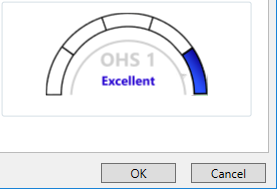
Click OK.
Notes:
The OK button is available only if the survey is complete.
If you attempt to close the dialog box before the survey is complete, a message appears and asks if you want to close without saving or if you want to return to the survey to complete it.
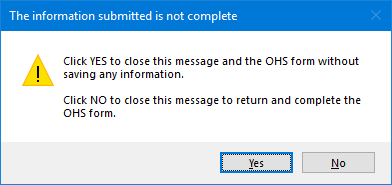
If you close the module from which you opened Clinical Notes (Family File, Ledger, Chart, or Appointment Book), the OHS Oral Health Status dialog box closes too.
If you close Clinical Notes, the OHS Oral Health Status dialog box remains open.
In the patient's More Information window, you can view or edit OHS surveys and view OHS graphs.