
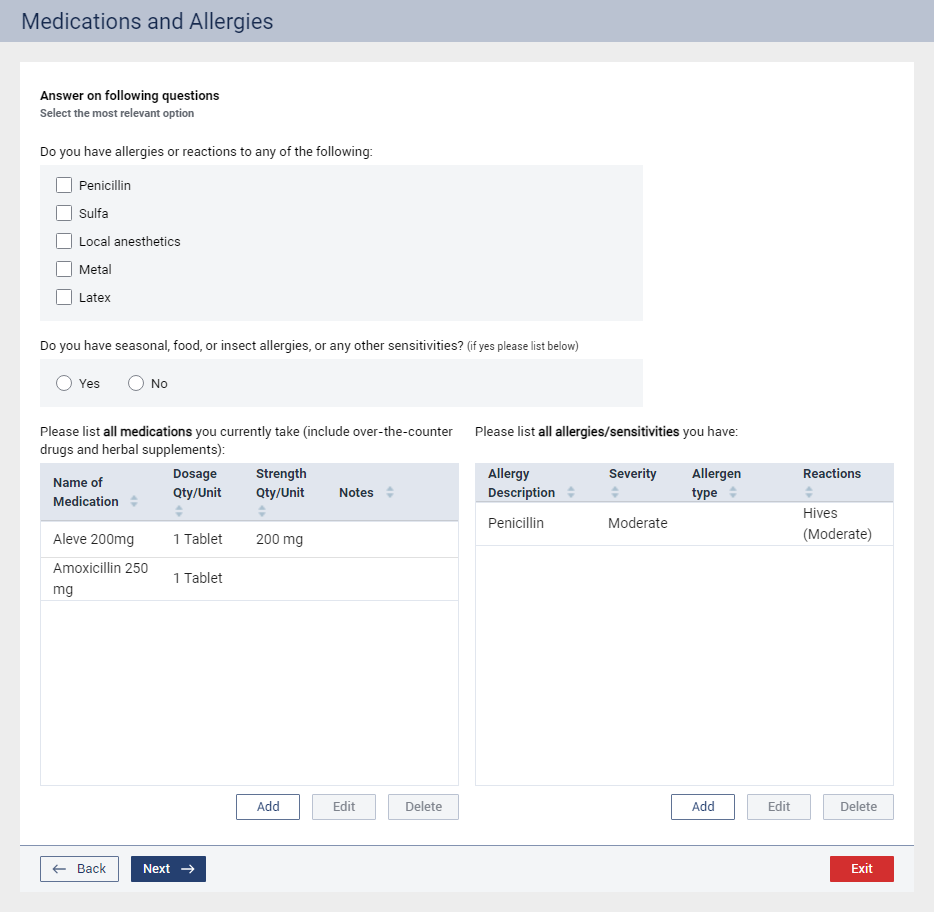
Optionally, answer the following questions:
Do you have allergies or reactions to any of the following – Select the checkboxes that correspond to the items that affect the patient:
Penicillin.
Sulfa.
Local anesthetics.
Metal.
Latex.
Do you have seasonal, food, or insect allergies, or any other sensitivities? (if yes please list below) – Select Yes or No to specify if the patient has any other sensitivities.
Please list all medications you currently take (include over-the-counter drugs and herbal supplements) – Do any of the following:
To add a medication, click Add, select a medication, set up the applicable options, and then click OK.
To edit a medication, select it, click Edit, make the necessary changes, and then click OK.
To delete a medication, select it, click Delete, and then click Ok to confirm the deletion.
Note: Prescriptions entered in the Patient Prescription window are listed, but you cannot edit or delete them from the assessment. From the assessment, you can add, edit, and delete only the medications that you can add, edit, and delete in the Medical Alerts window.
Please list all allergies/sensitivities you have – Do any of the following:
To add an allergy, click Add, select an allergy, set up the applicable options, and then click OK.
To edit an allergy, select it, click Edit, make the necessary changes, and then click OK.
To delete an allergy, select it, click Delete, and then click Ok to confirm the deletion.
Note: Allergies from the Medical Alerts window are listed. Making changes from the assessment affects the Medical Alerts window.