
Sending a reminder letter to patients with treatment plans can be an effective way of making contact. Dentrix makes the letter writing process simple by giving you access to pre-written letter templates with the click of a button.
To create a letter for a patient
1. In the Treatment Manager, select the patient you want to contact.
2. Click File, point to Switch To, and then click Quick Letters.
The Quick Letters dialog box appears.
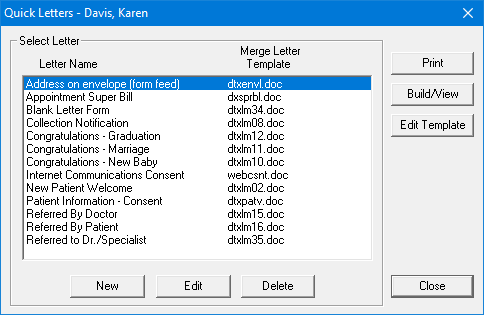
3. Complete the following tasks:
Under Select Letter, select the letter you want to merge.
To merge the letter in Microsoft Word, click Build/View.
Make any necessary changes to the letter's text, and then click Print.
Close the letter without saving changes, and then minimize Microsoft Word.
4. Repeat steps 1 – 3 for any other patients you want to send letters to.
Note: After your letter prints, an entry is automatically added to the Office Journal, indicating that a letter was sent to the patient.