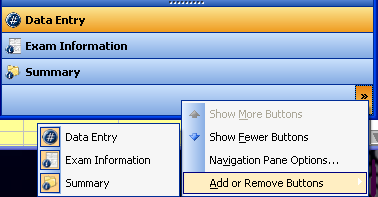
The Configure Buttons toolbar contains a menu with the following options and three buttons:
Show More Buttons – Click to make a button, such as Data Entry, visible again.
Show Fewer Buttons – Click to hide the currently selected button, such as Data Entry.
Navigation Pane Options – Click to rearrange the order of the Data Entry, Exam Information, and Summary buttons.
Add or Remove Buttons – Click to add or remove a button from the Configure Buttons toolbar.
Data Entry button – Click to view the Data Entry section on the Perio panel.
Exam Information button – Click to view the Exam Information section on the Perio panel
Summary button – Click to view the Summary section on the Perio panel.