
One type of financial arrangement you can make with customers is a payment agreement. Payment agreements are set up by account and not by patient. You can set up one payment agreement per account.
To enter a payment agreement payment
1. With a patient selected in the Ledger, in the File menu, click Billing/Payment Agreement.
The Billing/Payment Agreement Information dialog box appears.
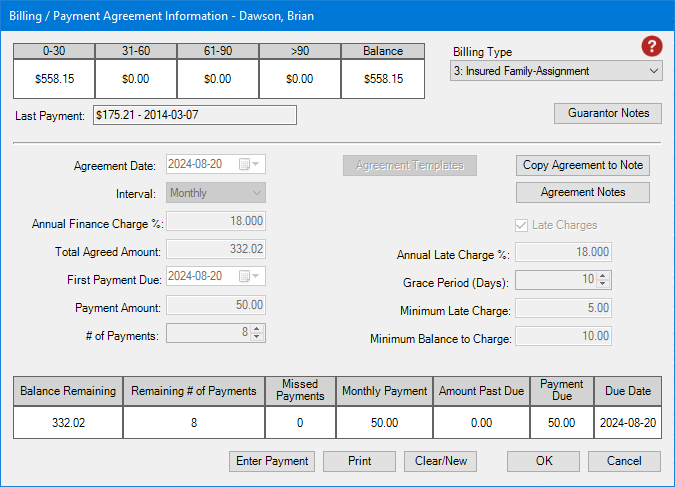
2. Click Enter Payment.
The Enter Payment dialog box appears.
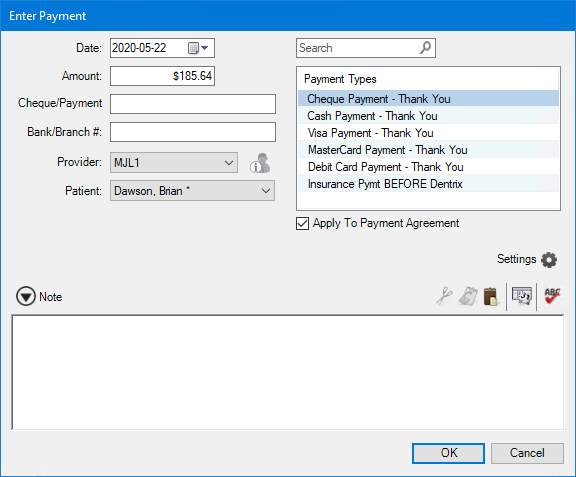
3. Do the following:
Date – If necessary, type a new date, or select one from the calendar.
Payment Types – Select the appropriate payment type from the list.
Amount – Type the amount of the payment.
Check/Payment # – Type the cheque or the payment number.
Bank/Branch # – Type the appropriate number. (This number appears on the Dentrix Deposit Slip.)
Provider – Defaults to the patient's provider.
Patient – Defaults to Family Account.
Note – If appropriate, type a note.
4. Click OK.
The payment is applied to the payment agreement.