
One type of financial arrangement you can make with customers is a payment agreement. Payment agreements are set up by account and not by patient. You can set up one payment agreement per account.
To create a payment agreement using a template
1. With a patient selected in the Ledger, in the File menu, click Billing/Payment Agreement.
The Billing/Payment Agreement Information dialog box appears.
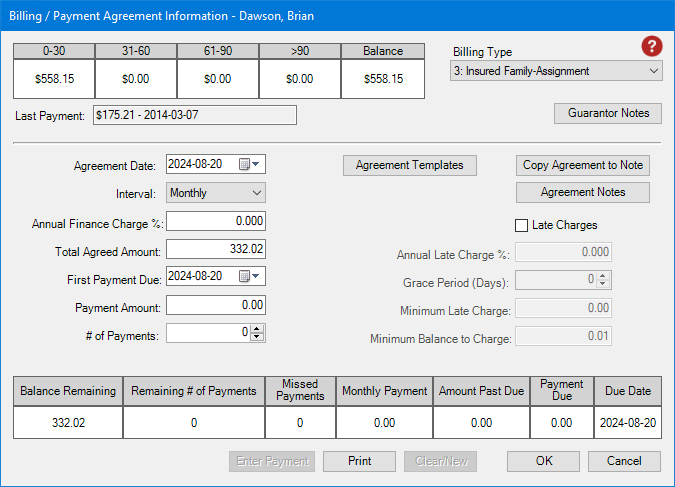
2. The current date appears in the Agreement Date field by default.
Note: Click the Down arrow to change the date of the agreement.
3. To apply a payment agreement template, click Agreement Templates.
The Select Payment Agreement Template dialog box appears.
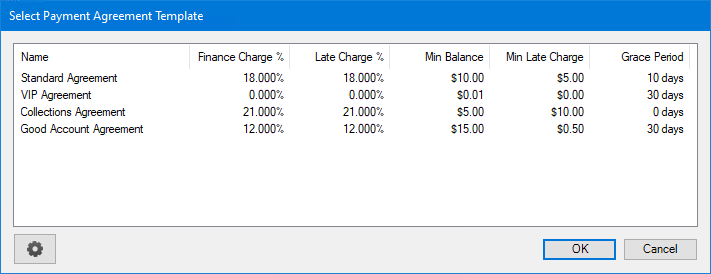
4. Select the template that you want to apply, and then click OK.
The template is applied to the Billing/Payment Agreement Information dialog box.
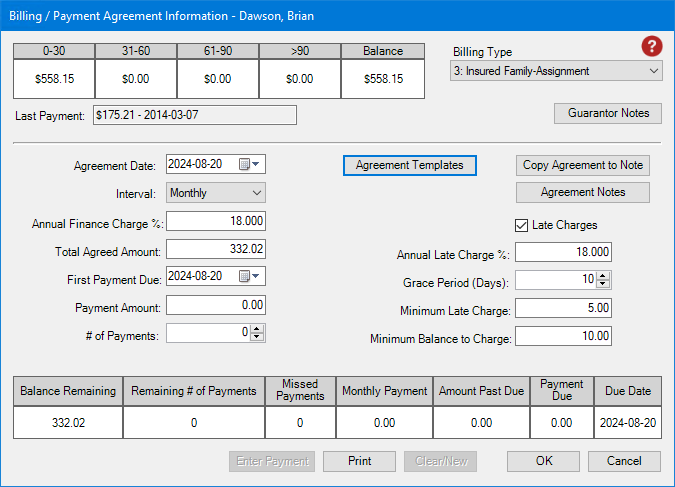
5. In the Payment Amount text box, type the amount of each payment.
The number of payments is calculated automatically.
Note: Alternately, you can set the # of Payments, and the payment amount is calculated automatically.
6. To create the payment agreement for the selected patient, click OK.