
If you have a number of pending insurance claims that must be closed manually each month because your patients are responsible for billing their insurance carriers, you can close those claims automatically.
Note: To learn more about setting the Assignment of Benefits options, click Entering a new insurance plan.
To close a non-assignment of benefit pending claim automatically
1. In the Ledger, click File, and then click Close Claims without Assignment of Benefits.
The Close Claims without Assignment of Benefits dialog box appears.
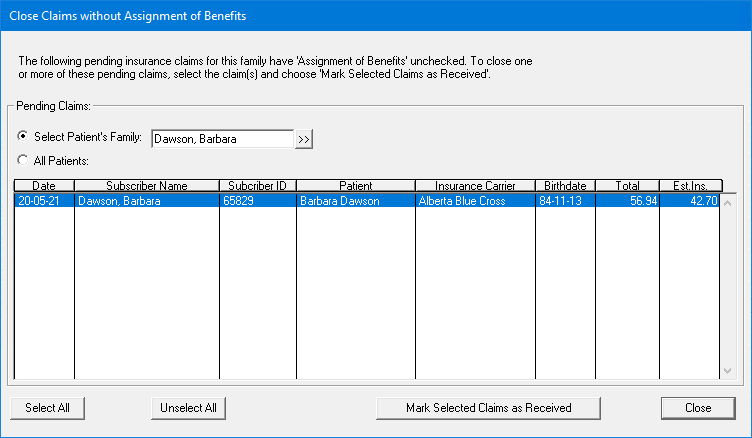
2. Under Pending Claims, select one of the following:
Select Patient's Family - Select to close any outstanding claims for the current patient in the Ledger. To select a different patient, click the search button and select the appropriate patient from the Select Patient dialog box.
All Patients - Select to close all outstanding non-assignment of benefits claims for all or selected patients.
A message appears stating that the list may take several minutes to generate depending on the size of your database, Click Yes to continue.
3. Do one of the following:
Click Select All to close all the claims in the list.
Click the claims that you want to close.
4. Click Mark Selected Claims as Received.
A message appears stating that the selected insurance claims will be marked as "Received."
5. To continue, click Yes.
The selected claims are posted to the Ledger as a $0.00 payment.
Note: You can print a copy of the claim from the Batch Processor to give your patient the necessary documentation to bill the insurance carrier.