
The Unscheduled Treatment Plans Report displays treatment plans that have been posted but not scheduled in the Appointment Book. Unlike the Unscheduled Treatment Plans List, the details included on this report are highly customizable.
|
Why: |
To ensure the practice follows up on treatment plans. |
|
When: |
Weekly. |
1. From the Treatment Manager, select View Setup.
The Treatment Manager View dialog box appears.
2. Select With an Unsched Appt to display treatment plans without a scheduled appointment.
3. Click Show Columns.
The Show Columns dialog box appears.
4. Add/remove the data you want included/excluded in the report in the Show these columns in this order list box.
5. Click OK to save the settings and close the Show Columns dialog box.
6. Click OK to save the settings and close the Treatment Manager View dialog box.
7. In the Treatment Manager, from the Print menu, click Treatment Manager List.
The Treatment Manager dialog box appears.
8. Select Include Treatment Plan Procedures, and then click Yes to run the report.
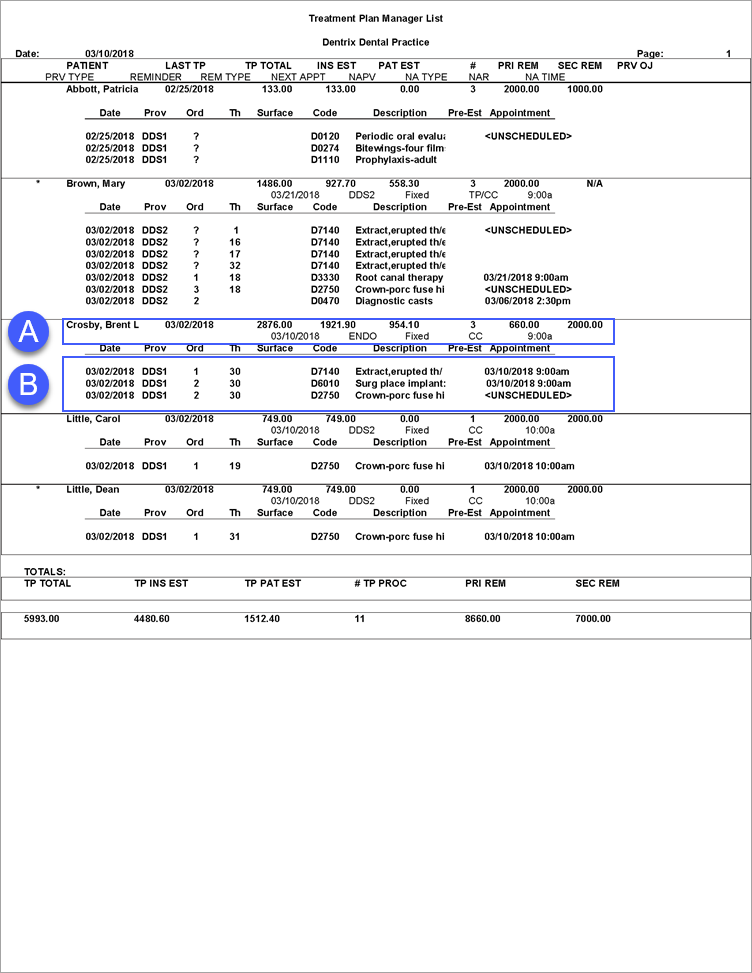
A. Patient Details – The information displayed in this section is highly customizable and depends on the settings configured in step 4 of How do I run the Unscheduled Treatment Plans Report – Treatment Manager? The following is a comprehensive list of the possible data:
# of TP Procedures |
Next Appt Type |
Best Time to Call |
Preferred Name |
Billing Type |
Prev OJ Entry Type |
Birthday & Age |
Prev Office Journal Entry |
CC Date |
Pri Dental Ins Benefits Rem |
Chart # |
Pri Dental Renewal Month |
E-mail Address |
Provider 1 |
Family Position |
Provider 2 |
Future Rem. Type |
Sec Dental Ins Benefits Rem |
Future Reminder Date |
Sec Dental renewal Month |
Guarantor Flag |
TP Dental Ins Estimate |
Home Phone |
TP Patient Estimate |
Last TP Date |
TP Total Amount |
Next Appt Date |
Unscheduled Appt Flag |
Next Appt Provider |
Work Phone & Ext |
Next Appt Time |
|
B. Treatment Planned Procedures – If you select Include Treatment Plan Procedures when setting options for this report, treatment-planned procedures appear on the report.

