
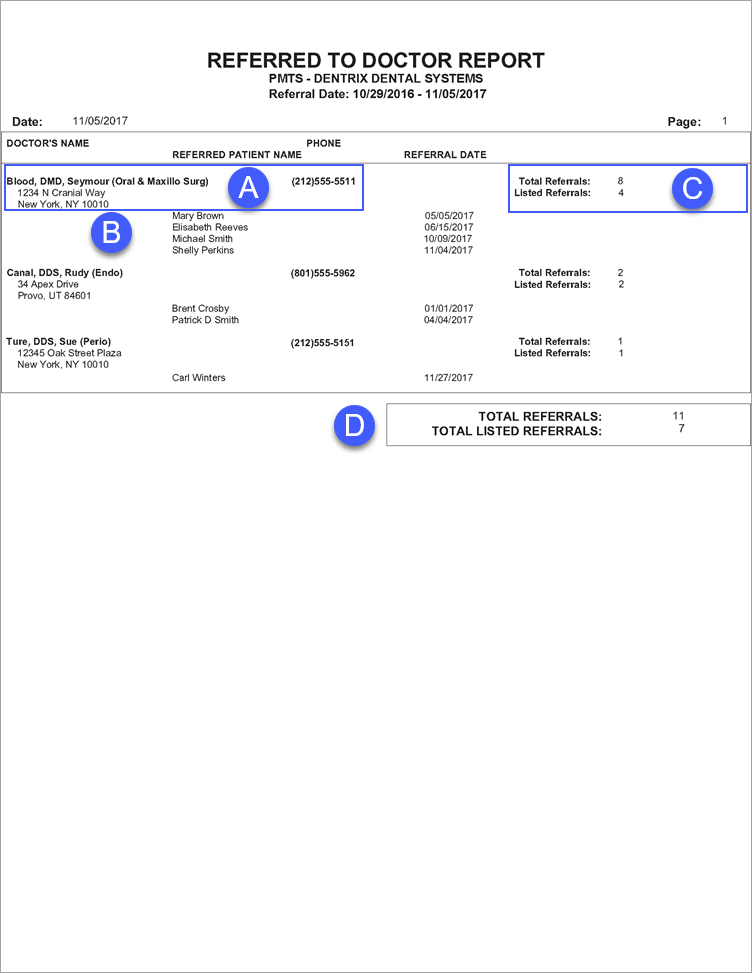
The Referred To Doctor Report lists the number of patients your practice has referred to another practice. Depending on report settings, this report also lists the name and referral date of each referral.
 |
Why: |
To maintain professional relations. |
When: |
As needed. |
In the Office Manager from the Reports menu, point to Management, and then click Referred TO Doctor Report. For step-by-step instructions on how to run this report, see the Dentrix Help (in the Office Manager from the Help menu, click Contents).
A. Doctor Information – The name, mailing address, and phone number of a doctor to which the practice provided referrals.
B. Referred Patients – If you select Include Referred Patients when running this report, the name and referral date of each referral appears on the report.
C. Doctor Totals
Total Referrals – The total number of patients referred to the doctor. Be aware that report filters have no affect on this number; this number represents the total number of patients ever referred to the doctor.
Listed Referrals – The total number of referrals listed for the doctor.
Note: This number appears only if you select Include Referred Patients when setting options for this report.
D. Report Totals
Total Referrals – The total number of referred patients.
Listed Referrals – The total number of referred patients listed in this report.
Note: Listed Referrals appears only if you select Include Referred Patients when setting options for this report.