
The Referred By Doctor/Other Report displays patients that have been referred to your practice by other doctors or non-person sources (for example, advertisements). This report also lists the production totals resulting from each referral.
|
Why: |
To identify effective referral sources, to track revenue generated as a result of a referral source, and to maintain professional relations. |
|
When: |
As needed. |
In the Office Manager from the Reports menu, point to Management, and then click Referred By Doctor/Other Report. For step-by-step instructions on how to run this report, see the Dentrix Help (in the Office Manager from the Help menu, click Contents).
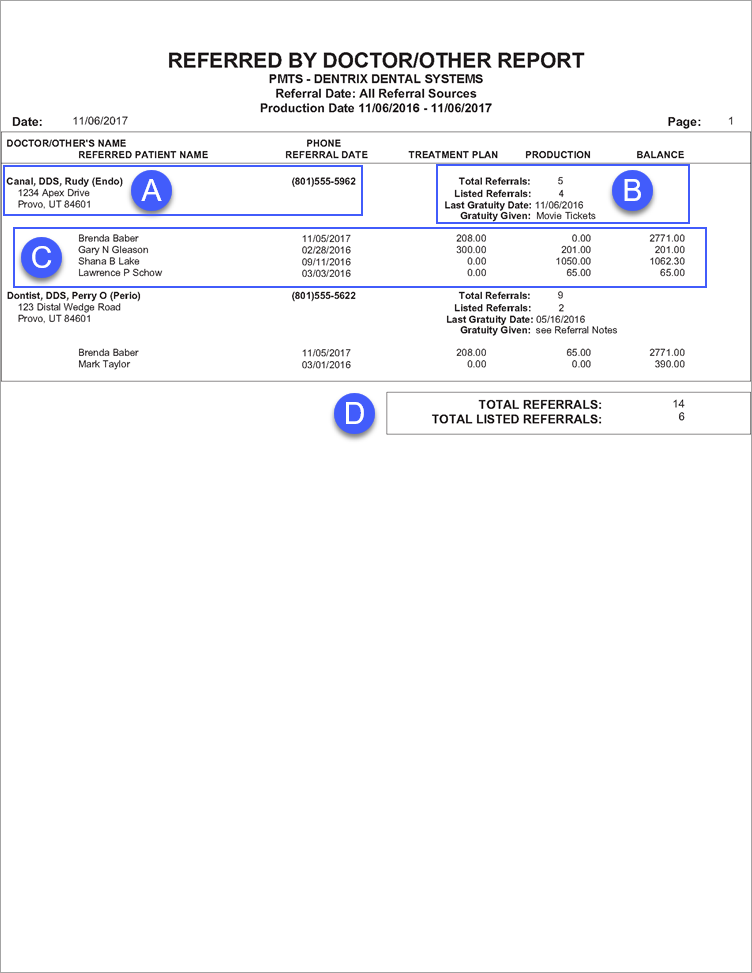
A. Doctor Information – The name, mailing address, and phone number of the referring doctor.
B. Referral Details – In addition to the date and description of the last gratuity given to the referral source, the following information appears on this report:
Total Referrals – The total number of patients referred by the referral source. Be aware that report filters have no affect on this number; this number represents the total number of patients ever referred by the referral source.
Listed Referrals – The total number of referrals displayed on the report for the referring doctor.
Note: This number appears only if you select Include Referred Patients when setting options for this report.
C. Referred Patients – If you select Include Referred Patients when setting options for this report, referred patients appear on the report. In addition to the name and referral date, the following information is listed for each referral displayed on the report.
Treatment Plan – The total value of treatment plans for the patient.
Production – The total value of completed procedures.
Note: If all production values are zero, clear the Include Patients With No Production or Treatment Planned Procedures check box when setting options for this report.
Balance – The patient’s current balance.
D. Report Totals
Total Referrals – The total number of patients referred by the referral sources.
Listed Referrals – The total number of referrals listed in this report.
Note: This number appears only if you select Include Referred Patients when setting options for this report.

