
The Referral Recap Report lists the work completed and/or treatment-planned for patients referred to your practice.
 |
Why: |
To inform the referring doctor of the work completed/planned as a result of the referral. |
When: |
Monthly or weekly. |
In the Office Manager from the Reports menu, point to Ledger, and then click Referral Recap; or, from the Patient Chart, from the File menu, point to Print, and then click Referral Recap. For step-by-step instructions on how to run this report, see the Dentrix Help (in the Office Manager or Patient Chart from the Help menu, click Contents).
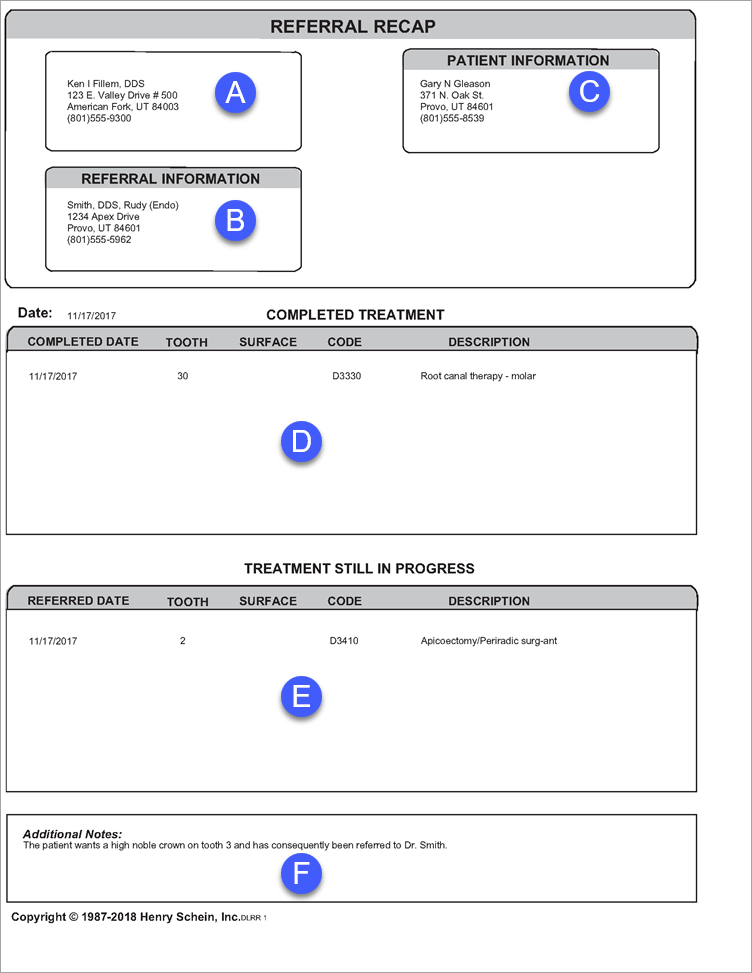
A. Provider – The provider associated with the referral.
B. Referring Doctor – The referring doctor.
C. Patient – The referred patient.
D. Completed Procedures – All procedures completed as a result of the referral.
E. Treatment Plans – All procedures treatment planned as a result of the referral.
F. Additional Notes – Additional notes entered in the Referral Recap Report dialog box.