
The Referral Analysis Report displays the number of referrals from each referral source. The report also displays the amount of production generated as a result of the referrals.
 |
Why: |
To compare referral sources, and to view the total number of referrals over a specified date range. |
When: |
As needed. |
In the Office Manager from the Analysis menu, click Dentrix Reports. Under Reports in the Dentrix Reports window, double-click Referral Analysis. For step-by-step instructions on how to run this report, see the Dentrix Help (in the Office Manager from the Help menu, click Contents).
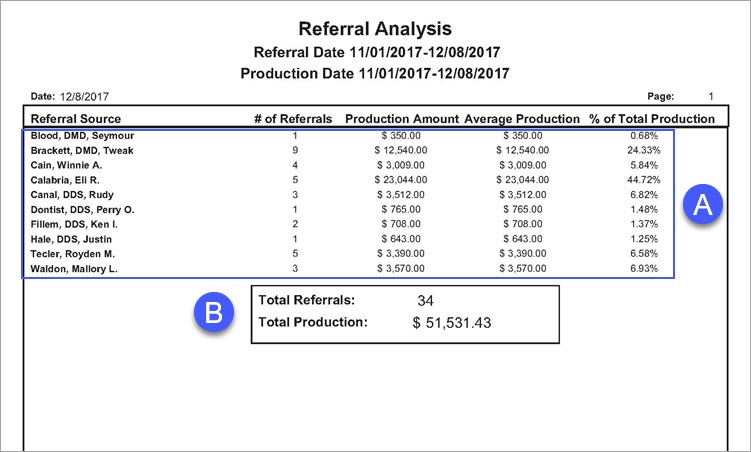
A. Referral Sources
# of Referrals – The number of referrals from the referral source.
Production Amount – The total amount of production resulting from the referral.
Percent of Production – The production total divided by the combined production total.
B. Report Totals – The combined total of referrals.
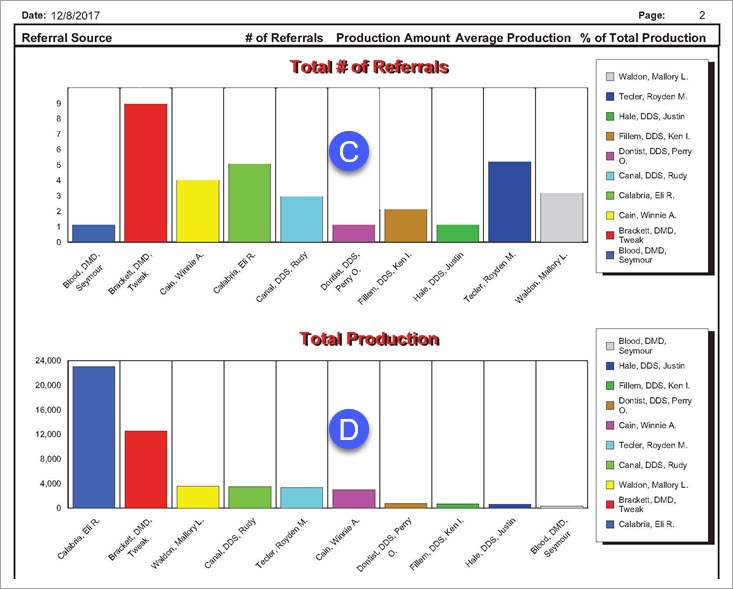
C. Total # of Referrals – The number of referrals generated by each referral source.
D. Total Production – The revenue generated by each referral source.