
The Daily Collections Report is similar to a deposit slip. However, not only does the report include payments by payment type but adjustments by adjustment type.
Also, for fraud protection, audit trail reports are sequentially numbered; each time you generate the Daily Collections Report or a deposit slip, the audit number increases by 1. This sequential numbering can alert the doctor to verify if the staff discarded or withheld something that they didn’t want the doctor to see or if the staff printed or viewed the report to see what they could change for their benefit and then reprint the report for the doctor.
|
Why: |
To ensure cash, check, credit card, and adjustment totals match up at the end of each day (the amount of cash left in the till is correct, each check has been accounted for, the total charges processed on your credit card machine, and the total adjustments posted are correct). |
When: |
Daily. |
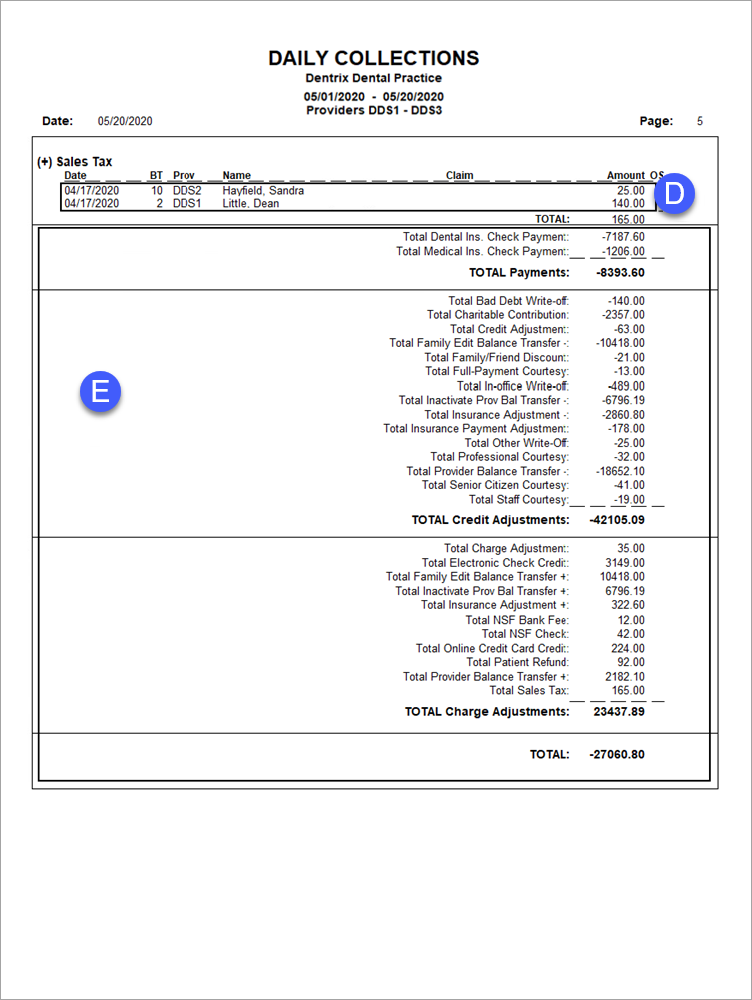
In the Office Manager, from the Reports menu, point to Management, and then click Day Sheet (Charges and Receipts). Ensure Daily Collections is selected. If this is the first time you are running the report, click the Options button, and select the payment and adjustment types you want included on the report. For step-by-step instructions on how to run this report, see the Dentrix Help (in the Office Manager, from the Help menu, click Contents).
A. Payments – (Not Shown) The payments posted to the Ledger. Payments are grouped and sub-totalled by type (the same subtotal appears in the totals section at the end of the report).
B. Credit Adjustments – (Not Shown) The credit adjustments posted to the Ledger. Adjustments are grouped and sub-totalled by type (the same subtotal appears in the totals section at the end of the report).
C. Debit Adjustments – (Not Shown) The debit adjustments posted to the Ledger. Adjustments are grouped and sub-totalled by type (the same subtotal appears in the totals section at the end of the report).
D. Details – The details of each payment, credit adjustment, or debit adjustment, including the date, name of patient or insurance carrier, and amount.
E. Totals – The subtotal of each payment, credit adjustment, and debit adjustment type (as shown throughout the report); the total payments, total credit adjustments, and total debit adjustments; and the combined total of all payments and adjustments.
