Navigating the lab cases list
You can easily navigate between the days on the lab cases list.
To change the date
-
Do one of the following:
-
On the Schedule menu, select Lab Cases.
-
On a location's Overview page (dashboard), click (or tap) the Outstanding Lab Cases box.
The Lab Cases page opens.
-
-
Do any of the following:
-
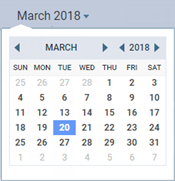
On the toolbar, click (or tap) the month and year to select a date.
-
On the toolbar, click (or tap) the Back button
 or Forward button
  to go back or forward one day or one week (depending on the view setting).
-
On the toolbar, click (or tap) 1 w, 1 m, or 6 m to quickly go forward one week, one month, or six months from the date you are viewing.
-
On the toolbar, click (or tap) Today to quickly return to the current date if you are viewing a date other than the current date.
-