Enabling the ASAP option for appointments booked online
When a patient books an appointment online, he or she can opt in to having that appointment be added to the ASAP list to indicate that he or she would like to be contacted if an earlier time slot becomes available.
Notes:
-
This feature is available only with a Dentrix Ascend Pro or Accelerate package.
-
This functionality must be enabled for each location individually in the Dentrix Ascend Online Scheduler. There is no bulk or organization-level setting.
-
A patient who opts in to having his or her appointment added to the ASAP list does not receive a confirmation text or email message that his or her appointment is on the ASAP list.
-
In Dentrix Ascend, you can manually review the ASAP list to contact patients about openings, or you can use a campaign to contact patients with appointments on the ASAP list about openings.
To enable the ASAP option for appointments booked online
-
If you are not already viewing the correct location, select it on the Location menu.
-
On the Settings menu, under Location, select Schedule Template.
The Schedule Template page opens.
-
Click (or tap) Online Booking Setup.
The toolbar looks like this image if you have enabled online scheduling.

The toolbar looks like this image if you upgraded to the new online scheduler.

The Online Booking Setup dialog box appears.
-
Click (or tap) Go To Booking Platform.

The Dentrix Ascend Online Scheduler website opens.
-
Click (or tap) the three vertical dots next to the location name, and then select Configuration.
-
Switch the Enable Patients to schedule appointments on ASAP List toggle on.
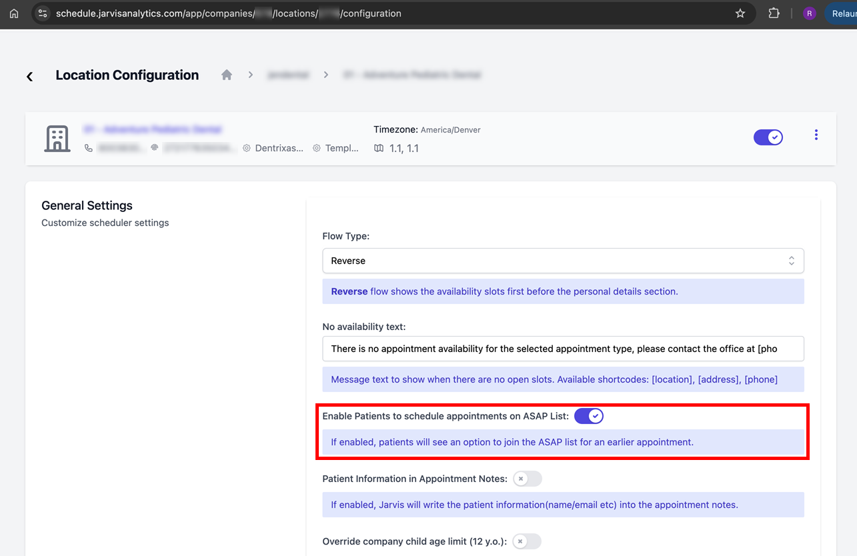
-
Click (or tap) Save.
-
Repeat these steps for each location.
For each location with this feature turned on, the option to join to ASAP list will now appear on the confirmation screen after a patient books an appointment online.