
You can add patient education topics to a case presentation. Some topics are provided topics by default, and you can create and customize others. You can also edit or delete patient education topics.
To add a patient education topic
1. Click the Patient Education tab.
The Patient Education panel appears.
Tip: To keep the panel expanded, click the push pin button.
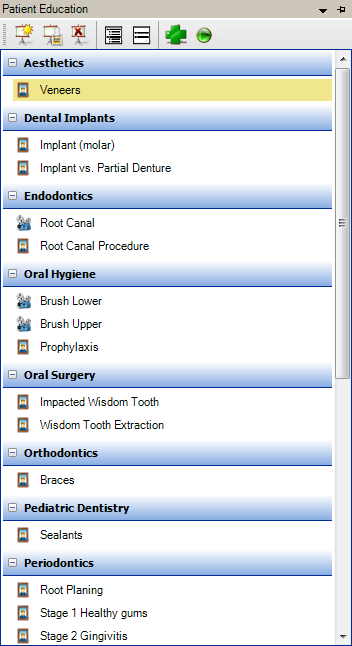
2. Select the patient education topic that you want to add to the case presentation.
Some topics are a part of Guru Limited Edition. The topics that are part of the Guru product contain "Guru" in the topic title. The following patient education topics are included by default:
Aesthetics
Veneers
Dental Implants
Implant (molar)
Implant vs. Partial Denture - GURU
Endodontics
Root Canal - GURU
Root Canal Procedure
Oral Hygiene
Brush Lower - GURU
Brush Upper - GURU
Prophylaxis
Oral Surgery
Impacted Wisdom Tooth - GURU
Wisdom Tooth Extraction
Orthodontics
Braces
Pediatric Dentistry
Sealants
Periodontics
Root Planing
Stage 1 Healthy Gums - GURU
Stage 2 Gingivitis - GURU
Stage 3 Mild Periodontitis - GURU
Stage 4 Moderate Periodontitis - GURU
Stage 5 Severe Periodontitis - GURU
Prosthodontics
Bridges
Bridges - GURU
Reference
3D Ref Bicuspid - GURU
3D Ref Cuspid - GURU
3D Ref Incisor - GURU
3D Ref Molar - GURU
Restorative
Class 1 - GURU
Composite (Resin) Fillings
Cracked Tooth - GURU
Crown - GURU
Crown Comparison - GURU
Inlay Comparison - GURU
3. In the toolbar, click Add to Case Presentation Outline.
The patient education topic is added to the case presentation.