
You can enter measurements greater than nine millimeters in the Perio Chart. However, you must enter these measurements using the number pad in the Data Entry section of the Perio panel.
To enter a measurement greater than nine millimeters
2. From the number pad in the Data Entry section, click the 1_ button.
Note: Alternately, you can use the forward slash key (/) on your keyboard.
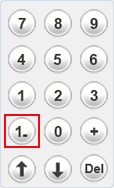
3. Click a second button corresponding to the measurement that you are taking. For example, if the measurement was 12 millimeters, you would click the 1_ button followed by the 2 button.
The greater than symbol (>) appears in red on the Data Chart.