
Ingenico Lane 3600
Dentrix 26.3 or higher
Note: Before enabling surcharging, you must notify both Worldpay and Mastercard using their required forms to ensure the Card Brands are properly informed, as each has specific timing rules that must be followed. Only after completing these notifications should you click the "Save Surcharge" button and then confirm "Yes" in the acknowledgement popup, which will configure Dentrix Pay and the payment device to allow surcharging.
Important: While Henry Schein One products facilitate surcharges, use of such products may be restricted by laws, rules, regulations, orders, directives, or other matters enacted, in force or effective by, for or with respect to any federal, state, local or other government, governing authority, agency or other body to which you may be subject. Where and when surcharging may be permitted, it may be subject to requirements, including customer notice and consent requirements, that are not addressed by or may conflict with the features of Henry Schein One products. By enabling surcharges and using the associated Dentrix features, you acknowledge and agree that you have independently reviewed applicable legal or other restrictions and requirements and you further acknowledge and agree that you remain solely responsible for determining whether and when you are permitted to surcharge, and for following any requirements associated with your choice to surcharge.
To enable surcharging in Dentrix Pay
1. In the Office Manager, click Maintenance, point to Practice Setup, point to Dentrix Pay, and then click Enable Dentrix Pay.
The Dentrix Pay Setup dialog box appears.
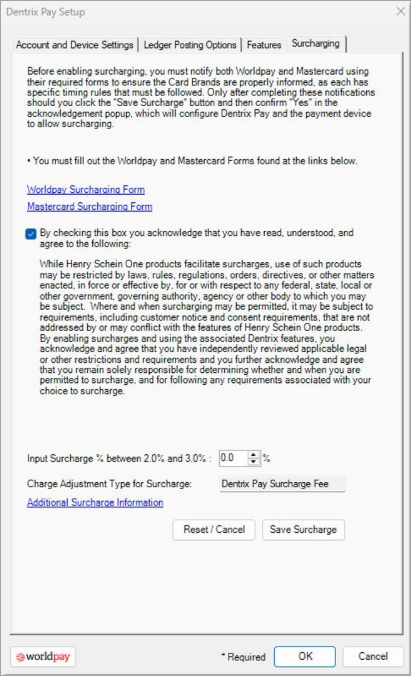
2. Click the Surcharging tab.
3. Read the first paragraph, and then do the following:
Click the links: Worldpay Surcharging Form and Mastercard Surcharging Form.
Complete the forms.
4. After reading the second paragraph, select the check box above the paragraph to acknowledge that you have read, understood, and agree.
5. Set the surcharge percentage between 2.0% and 3.0%.
6. Click Save Surcharge.