
When you need to adjust an account balance, an adjustment is posted to the patient's Ledger. By default, Dentrix includes several pre-defined adjustment types. You can add adjustment types as necessary to better meet the needs of your practice. You may have a total of 255 adjustment types.
To add an adjustment type
1. In the Maintenance menu in the Office Manager, point to Practice Setup, and then click Definitions.
The Practice Definitions dialog box appears.
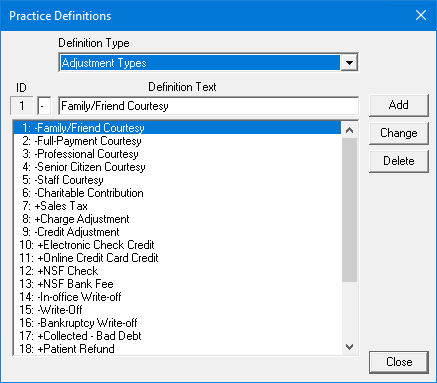
2. From the Definition Type list, select Adjustment Types.
The current list of adjustment types appears.
3. In the box to the left of the Definition Text, type a "+" sign if the adjustment will add to the account balance or a "-" sign if the adjustment will decrease the account balance.
4. In the Definition Text box, type the name of the adjustment type you want to add.
5. Click Add.
The new adjustment type is added to the bottom of the list.