
The Update Dental Insurance Payment Table report is a list of all procedures and the covered dollar amount for procedures listed in the Payment Table for the selected insurance carriers.
To generate the report
1. In the Office Manager, click Reports, point to Reference, and then click Updated Dental Ins Pmt Table.
The Updated Dental Insurance Payment Table dialog box appears.
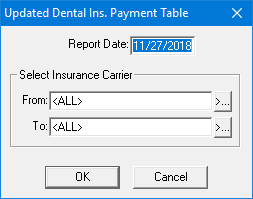
2. Type the Report Date that you want to print on the report. The default is the current date.
3. Under Select Insurance Carrier, select the range of insurance carriers that you want to include in the report by doing the following:
· Click the From search button and select the starting carrier
· Click the To search button and select the ending carrier.
4. Click OK to send the report to the Batch Processor.