
The Multi-Code List is a list of all or a specific range of multi-codes.
To generate the list
1. In the Office Manager, click Reports, point to Reference, and then click Multi Code List.
The Multi-Code List dialog box appears.
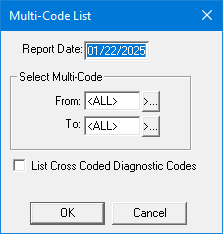
2. Type the Report Date that you want to print on the report. The default is the current date.
3. Under Select Multi-Code, select the range of procedure codes that you want to include by doing the following:
· Click the From search button to select the starting procedure for the range.
· Click the To search button to select the ending multi-code.
4. Select List Cross Coded Diagnostic Codes to include cross-coded diagnostic codes on the list.
5. Click OK to send the report to the Batch Processor.