
The Medical Code List is a list of all entered medical codes.
To generate the Medical Code List
1. In the Office Manager, click Reports, point to Reference, and then click Medical Code List.
The Medical Code List dialog box appears.
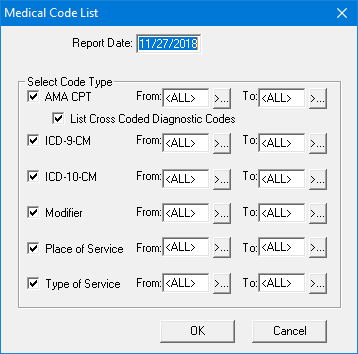
2. Type the Report Date that you want to print on the report. The default is the current date.
3. You have the following report options:
AMA-CPT - To include the AMA-CPT codes, select AMA-CPT. To include a range of codes, enter a range in the From and To fields. To include all codes, leave <ALL> entered in both fields. To include the linked ICD-9-CM codes, select List Included ICD-9-CM Codes.
ICD-9-CM - To include the ICD-9-CM codes, select ICD-9-CM. To include a range of codes, enter a range in the From and To fields. To include all codes, leave <ALL> entered in both fields.
Modifier - To include the Modifier codes, select Modifier. To include a range of codes enter a range in the From and To fields. To include all codes, leave <ALL> entered in both fields.
Place of Service - To include the Place of Service codes, select Place of Service. To include a range of codes enter a range in the From and To fields. To include all codes, leave <ALL> entered in both fields.
Type of Service - To include the Type of Service codes, select Type of Service. To include a range of codes enter a range in the From and To fields. To include all codes, leave <ALL> entered in both fields.
4. Click OK to send the report to the Batch Processor.