
The Family File's coverage table is a powerful tool that you can use to create treatment plan estimates that accurately reflect the actual benefits paid by an insurance carrier.
Using the coverage table, you can group several procedures into categories and assign the percentage the insurance will pay. You may also limit a category to a single procedure. When you edit a coverage table, you must use the ADA procedure codes, but you may not overlap the beginning and ending procedure codes in any given range.
Note: Updating or changing any benefit and coverage information will affect all patients who subscribe to the selected group plan.
To edit a coverage table category
1. With a patient selected in the Family File, double-click the Insurance Information block.
The Insurance Information dialog box appears.
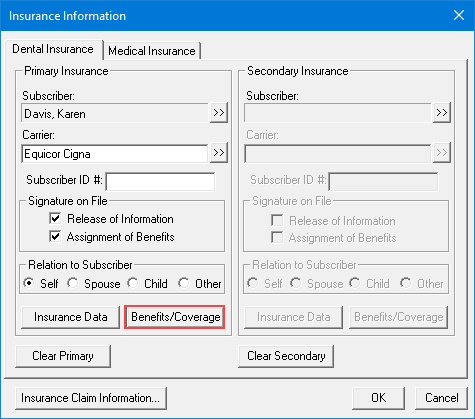
2. Click Benefits/Coverage.
The Dental Insurance Benefits and Coverage dialog box appears.

3. Click the Coverage Table tab.
The Coverage Table for the selected patient appears.

4. In the coverage table list, select the category that you want to edit, click the Edit button, and then change one or more of the following:
· Beg Proc - Type the beginning code of the procedure code range.
· End Proc - Type the end code of the procedure code range.
Note: You must use the ADA procedure codes, and you cannot overlap the beginning or ending procedure codes in any range. To assign a single code to a category, make the beginning and end codes the same.
· Category - Type a name for the procedure code range.
· Cov% - Type the percentage that the insurance plan pays for the procedures in the code range after any deductibles.
Note: A 0% coverage is estimated for any procedure codes not listed in the coverage table.
· Deductible - Select a type for the procedure code range:
· Standard - Applies to most procedures.
· Preventive - Applies if the carrier has a separate deductible for preventive/diagnostic procedures.
· Other - Applies if the carrier has a separate deductible for specific procedures other than preventive/diagnostic or for non-standard procedures.
· None - Applies when subscribers pay one deductible for the life of the policy.
· Co-Pay - (DHMO or Capitation Plans) Type the amount the patient pays.
Note: Select a Co-Payment Calculations for Ins. Portion menu option only when one or more co-pay amounts are entered in the coverage table. Usually, the patient portion owed is estimated by subtracting the calculated insurance portion from the amount for the procedure. When you use co-payments, the patient portion is the amount shown in the Co-Pay column of the coverage table, or less, for procedures in the category range (even if the amount is $0.00). The Co-Payment Calculations for Ins. Portion menu option you select is used to calculate the insurance portion for all procedures. When you use co-payments, the total of the patient portion and the insurance portion may be less than the procedure amount, depending on the option you selected and the percentage entered in the Cov% column.
· Pre-Auth Required - Select if the insurance carrier requires a pre-authorization for the procedures in the code range.
5. Do one of the following:
· To save your changes, click Save.
· To undo your changes, click Undo.