

You can add new referral sources. Sources can be a person or an object such as an ad, an internet search result, or some other type of non-person.
To add a new referred by source
1. With a patient selected in the Family File window, double-click the Referred By card.
The Patient Referrals dialog box appears.
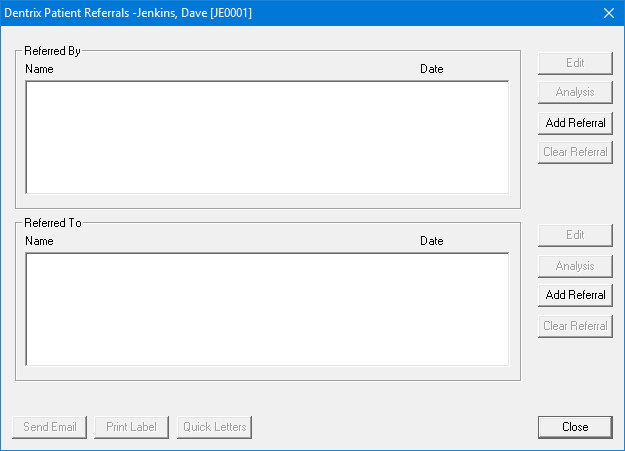
2. Under Referred By, click Add Referral.
The Select Referral Type dialog box appears.
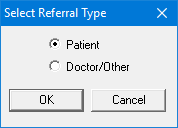
3. Select Doctor/Other, and then click OK.
The Select Referred By dialog box appears.
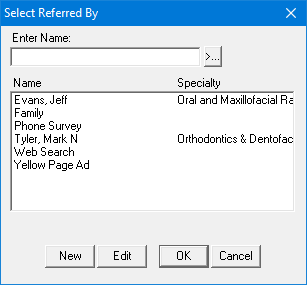
4. Click New.
The Referred By Information dialog box appears.
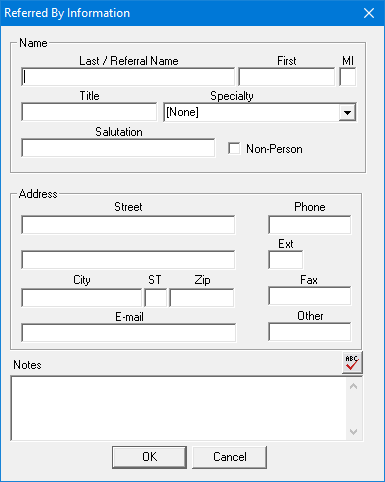
5. As applicable, do the following, and then click OK.
Name
Last/Referral Name – Type the source's name.
First – Type the source's given name.
MI – Type the source's middle initial.
Title – Type the source's title.
Specialty – Select the source's specialty from the list.
Salutation – Type a salutation.
Non-Person – Select if the referral source was an ad, the result of an internet search, or survey.
Note: Selecting Non-Person prevents this referral source from receiving correspondence, gratuity, and so forth.
Address
Street – Type the source's street address.
Phone – Type the source's phone number.
Ext – Type the source's extension.
City – Type the source's city.
ST – Type the two-letter postal code for the source's state.
Zip – Type the source's ZIP code.
Fax – Type the source's fax number.
E-mail – Type the source's email address.
Other – Type the source's alternate phone number.
Notes – Type a note in the text box.