
You can export multiple documents to the same location using the Document Center.
To export multiple documents to the same location
1. Select the documents that you want to export in the Document Tree.
2. Click File, and then click Export Document(s).
The Export Documents dialog box appears.
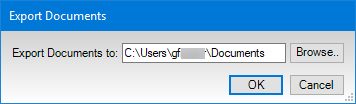
3. Browse to the location where you want the documents exported, and then click OK.
Note: When you export OLE type documents in bulk, the file extension will be the same as when the document was imported into the Document Center. Image documents, when exported in bulk, will have the file extension that was selected in the Document Center Preferences.